
I used to think a landing page was just another pretty page on a website.
Now I see it differently.
A landing page is where a casual reader can become an email subscriber, a digital product buyer, a webinar attendee, a course student, or someone who finally trusts your blog enough to come back. And if you are building a blogging business on a small budget, choosing the right WordPress landing page builder can save you months of confusion, plugin clutter, and unnecessary subscriptions.
I am not writing this as someone who has already cracked the “six figures a month” secret and now wants to sell you the dream. I am writing this as a blogger who is still searching, testing, comparing tools, watching what successful bloggers do, and trying to make the online business journey easier for the person who is a few steps behind me.
Because honestly? A lot of blogging advice sounds simple after someone has already made it. “Just build a funnel.” “Just grow your email list.” “Just sell a digital product.” But when you are the one sitting in front of WordPress, wondering which landing page builder to use, which free plugin is enough, and whether you really need another paid tool, it does not feel simple.
So this guide is for the blogger who wants a practical answer.
We are going to talk about the best WordPress landing page builders, what each one is good for, which ones make sense if you are keeping costs low, and how to choose based on your real blogging goals — not just what looks popular in a guru’s screenshot.
Quick Answer: What Is the Best WordPress Landing Page Builder?
If you want the quickest, honest answer, I would choose based on your current stage:
| Blogging stage | Best landing page builder option | Why it fits |
|---|---|---|
| Absolute beginner with no budget | WordPress Block Editor + Patterns | Free, already inside WordPress, and good enough for simple pages |
| A blogger who wants design freedom for free | Elementor free version | Visual drag-and-drop builder with a generous free starting point |
| Blogger focused on opt-ins and launches | SeedProd or Thrive Architect | Built with landing pages, conversions, and campaigns in mind |
| Blogger building several sites | Divi or Beaver Builder | Useful when you want reusable layouts and more site-building flexibility |
| Blogger who wants a lightweight setup | Block Editor + Spectra | Works close to WordPress core without feeling too heavy |
If I were starting again with almost no money, I would not immediately buy the most expensive builder. I would start with the WordPress Block Editor, test my offer, and only upgrade when I clearly needed better templates, better opt-in forms, split testing, popups, checkout support, or more design control.
That is the first trick I wish more beginner bloggers knew: do not buy the fancy funnel before you know what you are selling or what your audience actually wants.
What Is a WordPress Landing Page Builder?
A WordPress landing page builder is a tool that helps you create focused pages without coding. These pages are usually designed for one clear action, such as joining your email list, downloading a freebie, buying a product, booking a call, registering for a webinar, or clicking through to an offer.
A normal blog post teaches. A landing page converts.
That does not mean it needs to be pushy. Actually, the best landing pages are often simple, clear, and helpful. They answer the reader’s quiet question: “Is this worth my time, email address, or money?”
For bloggers, landing pages usually support things like:
- Free lead magnets
- Email newsletter signups
- Digital product sales pages
- Mini-course signup pages
- Affiliate bonus pages
- Resource library pages
- Waitlist pages
- Webinar or workshop pages
If you are still planning what to offer, you may find it helpful to pair your landing page with simple lead magnet ideas. I have a full guide on lead magnet ideas for bloggers, and that is honestly where many bloggers should start before obsessing over page design.
Why Bloggers Need Landing Pages More Than They Think
Bloggers often spend months writing posts, designing logos, tweaking colors, and watching traffic numbers. But the bloggers who turn their sites into real businesses usually build a path.
That path often looks like this:
Helpful blog post → relevant internal link → landing page → email list → trust → offer.
This is one of the quiet things blogging gurus do well. They do not just publish random content and hope. They connect their content to a simple system.
For example, a post about blog traffic may lead to a free SEO checklist. A post about Pinterest may lead to a pin template bundle. A post about digital products may lead to a mini-course. A review post may lead to an affiliate bonus page.
If you are building an AI blogging site, your landing pages can support:
- A free AI prompt pack
- A content calendar template
- An SEO checklist
- A Pinterest workflow guide
- A low-cost mini-course
- An affiliate resource page
- A “start here” tool stack
This is why I also like connecting landing pages with articles like how to monetize your blog from day one, because monetization becomes easier when each page has a clear next step.
What I Look for in a WordPress Landing Page Builder
When I compare landing page builders, I do not only ask, “Is it pretty?”
I ask:
- Can I build a page quickly without hiring a designer?
- Is there a free plan or low-cost version?
- Will it slow down my site?
- Does it work with my email marketing tool?
- Can I create a clean mobile version?
- Can I reuse templates?
- Does it lock me into messy shortcodes if I ever remove it?
- Can it help me build pages that support real blogging income?
Because a landing page builder should help your business, not become another confusing tool you have to babysit.
Google’s own guidance around helpful content reminds creators to make content for people first, not just for search engines. I think the same idea applies to landing pages. A good landing page should help the visitor understand the offer clearly, not just look impressive. You can read Google’s guidance on creating helpful, reliable, people-first content if you want to understand the bigger SEO mindset behind that.
Best WordPress Landing Page Builders for Bloggers

1. WordPress Block Editor: Best Free Option If You Want to Keep Things Simple
The WordPress Block Editor is the most underrated landing page builder for bloggers who are still early in the journey.
It is already inside WordPress. It costs nothing extra. And with block patterns, columns, buttons, cover sections, images, and groups, you can build a basic landing page without installing a heavy page builder.
WordPress describes block patterns as collections of blocks that you can insert and customize, which makes them useful when you do not want to start every page from scratch. You can explore the official WordPress Pattern Directory to see how many layouts are already available.
This is a smart starting point if you need:
- A simple lead magnet page
- A newsletter signup page
- A resource page
- A waitlist page
- A basic affiliate bonus page
The main downside is that it may not feel as flexible as a full drag-and-drop builder. You may need more patience with spacing, columns, buttons, and mobile adjustments.
But for low-cost bloggers, I think this is where many people should begin.
My blogger take: If you do not have an offer yet, do not pay for a complicated landing page builder. Use the Block Editor, create a simple opt-in page, and test whether people actually want the freebie.
2. Elementor: Best Visual Free Builder for Bloggers Who Want More Design Control
Elementor is one of the most popular WordPress page builders because it gives you a visual drag-and-drop editing experience. You can build pages by dragging sections, headings, buttons, images, icons, forms, and other widgets into place.
The official Elementor site explains that its free website builder includes drag-and-drop tools, templates, and AI capabilities, while Elementor Pro unlocks more advanced features. You can check the current details on the Elementor website builder page and compare plans on the Elementor pricing page.
I like Elementor for bloggers who care about how their page looks but are not ready to hire a designer.
It works well for:
- Lead magnet pages
- Simple sales pages
- Affiliate bridge pages
- Service pages
- Homepage sections
- About pages
The free version can be enough for basic landing pages. But if you want advanced forms, popups, theme building, WooCommerce features, or deeper marketing features, you may eventually need Pro.
My blogger take: Elementor is great when design is slowing you down. But be careful not to spend three days adjusting button shadows instead of writing the offer, creating the freebie, or building the email sequence.
If you like using AI to move faster, you can pair a builder like Elementor with your own AI workflow. For example, you can draft page sections with tools from my guide on best AI writing tools, then polish the message yourself so it still sounds human.
3. SeedProd: Best for Landing Pages, Coming Soon Pages, and Launch Campaigns
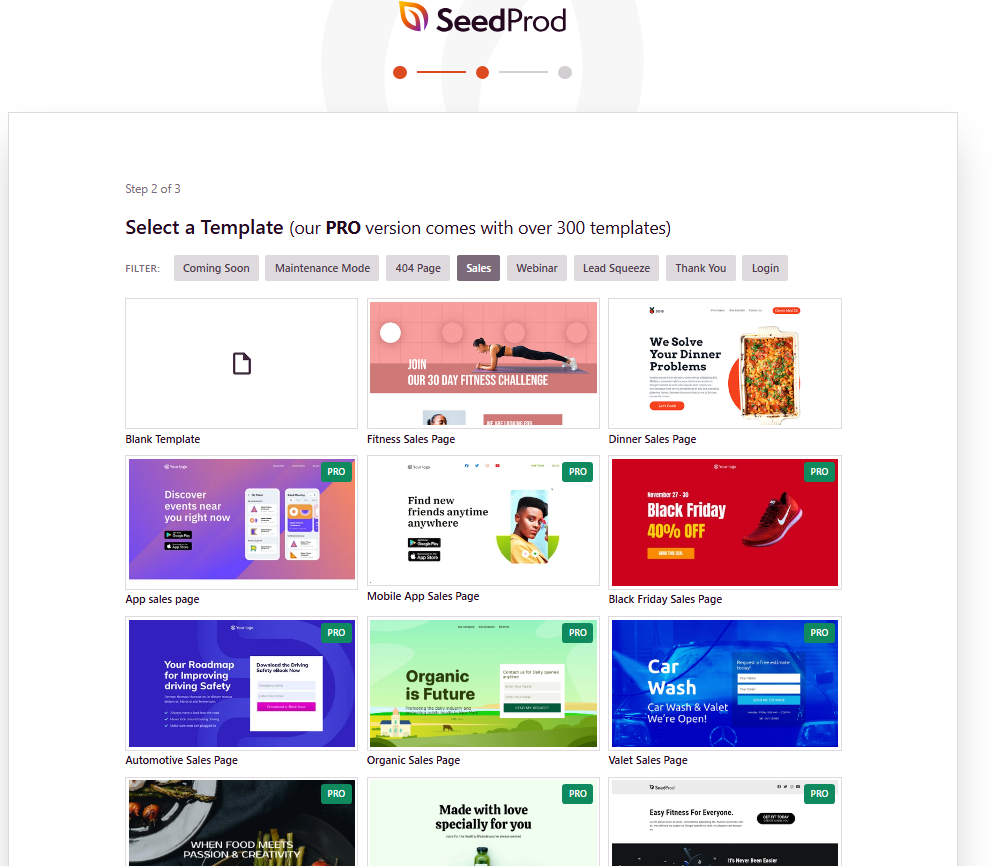
SeedProd is more landing-page-focused than many general page builders. It is often used for coming-soon pages, maintenance-mode pages, sales pages, opt-in pages, webinar pages, and campaign pages.
The official SeedProd site positions it as a drag-and-drop WordPress website and landing page builder, and its pricing page lists different paid plans with templates and page-building features. You can check the current plan details on SeedProd pricing.
SeedProd makes sense if your priority is not just “build a pretty page,” but “build a campaign page quickly.”
It can be useful for:
- Launching a digital product
- Collecting waitlist emails
- Creating a coming soon page
- Building a webinar signup page
- Making a sales page for a small offer
- Testing multiple lead magnets
The free version may be enough for very simple pages, but serious campaign features usually sit behind paid plans.
My blogger take: SeedProd is attractive when you are ready to build real funnels. But if your blog has no email strategy yet, start simpler. A tool cannot fix an unclear offer.
If you are still creating your first freebie, you may want to start with a simple lead magnet generator workflow or a PDF lead magnet before investing too much in design.
4. Divi: Best for Bloggers Who Want a Full Design System
Divi is both a WordPress theme and a visual page builder from Elegant Themes. It is popular with bloggers, freelancers, and site owners who want a lot of design freedom and pre-made layouts.
The official Divi page highlights its large collection of pre-designed layouts, and the Elegant Themes pricing page explains its access model. You can review Divi’s builder features and Divi pricing directly.
Divi can be a good option if you like visual building and want to create many different page types on the same site.
It works well for:
- Landing pages
- Homepages
- Sales pages
- Service pages
- Portfolio-style pages
- Digital product pages
The possible downside is that Divi is a full ecosystem. Some bloggers love that. Others prefer to stay closer to the native WordPress editor.
My blogger take: Divi is best when you want a design system and you are willing to learn it properly. I would not choose it just to create one simple email opt-in page.
5. Beaver Builder: Best for Stability and Cleaner Long-Term Site Building
Beaver Builder has a reputation for being stable, developer-friendly, and less overwhelming than some builder ecosystems. It is a front-end drag-and-drop builder for WordPress, and the official WordPress plugin page describes it as a flexible page builder that lets you build without writing HTML or dealing with confusing shortcodes.
You can check the official Beaver Builder plugin page or review the Beaver Builder pricing options if you are comparing long-term costs.
It is not always the flashiest builder, but that can actually be a good thing.
Beaver Builder is useful for:
- Bloggers who want clean layouts
- Simple landing pages
- Reusable page templates
- Small business pages
- Freelancers building client pages
My blogger take: Beaver Builder is a good choice if you care more about stability and less about trendy design effects. For a blogger who wants to build pages and move on, that matters.
6. Thrive Architect: Best for Conversion-Focused Bloggers
Thrive Architect is built for marketers, course creators, and bloggers who care about conversions. It is not just about making pages look nice. It is designed around landing pages, call-to-action sections, lead generation, and sales-focused layouts.
The official Thrive Architect page describes it as a WordPress landing page builder and lists pricing for standalone access and related Thrive products. You can check the latest details on the Thrive Architect page.
Thrive Architect can be useful for:
- Sales pages
- Course launch pages
- Webinar pages
- Lead magnet pages
- Quiz funnel pages
- Affiliate bonus pages
It is probably more than you need if you are only making a simple “download my checklist” page. But if your blog is moving toward products, funnels, and email marketing, it becomes more interesting.
My blogger take: Thrive Architect feels closer to what marketing-focused bloggers need. But I would only pay for it when I have a real plan to use landing pages consistently.
7. Spectra: Best Lightweight Builder for Block Editor Fans
Spectra adds extra blocks to the WordPress Block Editor, so it feels like a middle ground between native WordPress and a full visual builder. The plugin page says Spectra helps power up Gutenberg with advanced blocks to speed up website creation.
You can view it on the official Spectra WordPress plugin page.
This is a good option if you like the Block Editor but want more design flexibility without jumping into a heavier builder.
Spectra can be useful for:
- Opt-in pages
- Feature sections
- Simple sales pages
- Homepage layouts
- Resource pages
- Blogging business pages
My blogger take: If you want low cost, speed, and simplicity, Block Editor plus Spectra is one of the smartest setups to test before paying for a bigger builder.
WordPress Landing Page Builder Comparison
| Builder | Best for | Free option? | My honest blogger opinion |
|---|---|---|---|
| WordPress Block Editor | Simple landing pages and lead magnets | Yes | Best starting point if money is tight |
| Elementor | Visual design freedom | Yes | Great free builder, but do not over-design |
| SeedProd | Launch pages and opt-in campaigns | Limited/lite version | Good when you are ready for funnels |
| Divi | Full site design system | No traditional free plan | Powerful, but best if you want the whole ecosystem |
| Beaver Builder | Stable page building | Lite version | Not flashy, but dependable |
| Thrive Architect | Conversion-focused landing pages | No full free plan | Strong for serious email list and sales funnels |
| Spectra | Block Editor upgrades | Yes | Lightweight and beginner-friendly |
Free vs Paid WordPress Landing Page Builders: What Should You Choose?
If you are a beginner blogger, I would not start with the most expensive tool just because someone earns more than you do.
This is one of the traps I see everywhere online. A successful blogger says, “This is my landing page tool,” but they may already have traffic, a team, paid products, affiliate income, and an email list. Their tool stack fits their current business. It may not fit your starting point.
Here is how I would think about it:
Use a free builder if:
- You are still testing your niche
- You do not have steady traffic yet
- You are building your first lead magnet
- You do not know what your audience wants yet
- You mainly need simple pages
Upgrade to a paid builder if:
- Your freebie is getting signups
- You are selling a digital product
- You need better templates
- You need email integrations
- You want popups or advanced forms
- You are building several landing pages
- You are losing time fighting the free setup
My rule is simple: pay when the tool removes a real bottleneck, not when it only makes you feel more professional.
The Landing Page “Guru Tricks” I Actually Pay Attention To
I do not love fake income screenshots or vague “six figure secrets.” But I do pay attention to patterns.
When I study bloggers and creators who grow faster, I notice they often use landing pages in a few smart ways.
1. They build one landing page for one reader’s problem
They do not create a messy page with five different offers. They pick one pain point and one action.
Example:
- “Download the AI blog post checklist”
- “Get the Pinterest SEO starter guide”
- “Join the free 5-day email course”
- “Grab the blog monetization tracker”
If your audience is interested in Pinterest, you can send them to a targeted freebie from an article like Pinterest SEO or Pinterest marketing strategy.
2. They connect every traffic source to a landing page
A blog post is not the end. Pinterest is not the end. Google traffic is not the end. Social media is not the end.
The next step is usually a landing page.
If someone reads your article about AI SEO tools, you can invite them to download an SEO prompt checklist. If they read your guide to AI keyword generator tools, you can offer a free keyword planning template.
This is how internal linking starts to become a business system, not just an SEO habit. Google also recommends making links crawlable and using clear anchor text so users and search engines understand where a link goes. You can read more in Google’s SEO link best practices.
3. They make the offer feel specific
“Join my newsletter” is usually weak.
“Get my 30 ChatGPT prompts for faster blog post outlines” is stronger.
Specific wins because the reader understands the benefit.
If you already have content around ChatGPT prompts for blog posts or SEO prompts for ChatGPT, a landing page for a prompt pack would make sense.
4. They reuse layouts instead of starting from zero
This is one of the least glamorous but most useful tricks.
Successful bloggers do not redesign everything every time. They save landing page layouts, reuse sections, test headlines, and change the offer.
That is where builders like Elementor, SeedProd, Divi, Beaver Builder, Thrive Architect, and Spectra can help. The tool is not magic. The reusable system is the magic.
5. They keep landing pages distraction-free
A good landing page usually does not need a full sidebar, 20 menu items, random ads, and three different calls to action.
It needs:
- A clear headline
- A promise that matches the traffic source
- A short explanation
- Proof or trust signals
- A simple form or button
- A clean mobile layout
This is where I remind myself: simple is not amateur. Simple is often what converts.
My Simple Landing Page Formula for Bloggers
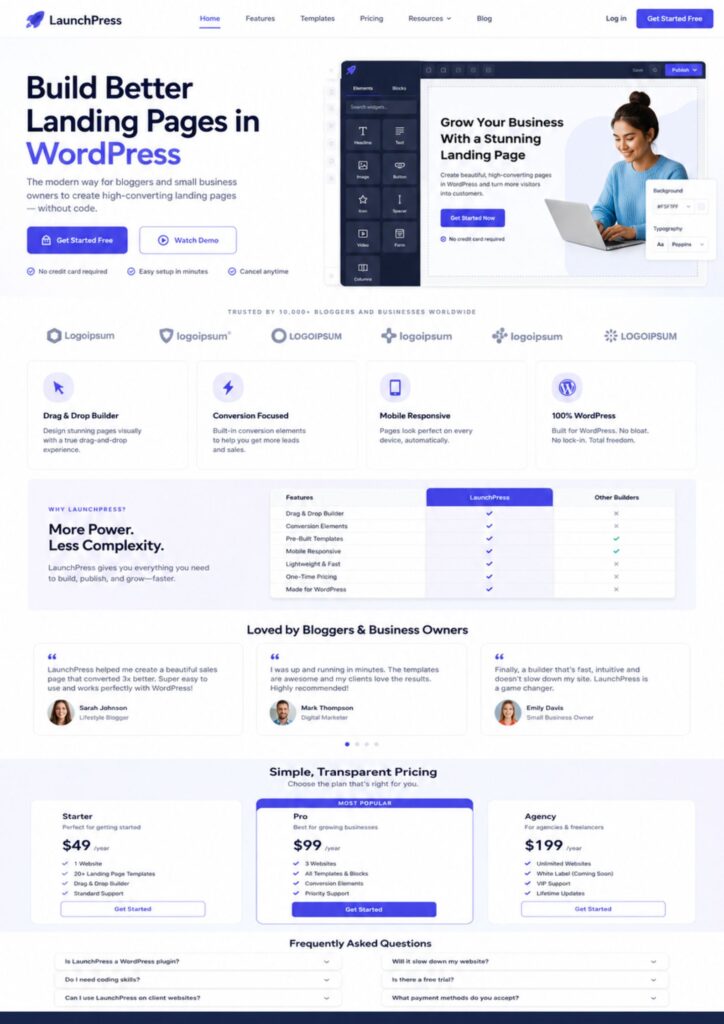
If you are building your first landing page, use this structure before trying anything fancy:
Section 1: Clear headline
Tell the reader exactly what they get.
Example: “Get the Free AI Blog Post Checklist I Use Before Publishing.”
Section 2: One-sentence promise
Explain the result in plain language.
Example: “A simple checklist to help you plan, write, optimize, and polish blog posts without feeling lost in AI tools.”
Section 3: What is included
Use bullets. Make it easy to scan.
- SEO planning prompts
- Blog outline steps
- Human editing reminders
- Internal linking checklist
- Final publishing checks
Section 4: Why it helps
This is where you speak to the reader’s real frustration.
Example: “If you are tired of opening ChatGPT, getting a generic draft, and still not knowing whether the post is actually useful, this checklist gives you a calmer process.”
Section 5: Opt-in form or button
Make the action clear.
Example: “Send me the checklist.”
Section 6: Trust note
Tell them who it is for and what to expect.
Example: “Made for beginner bloggers, small website owners, and content creators who want to use AI without publishing robotic content.”
This type of landing page could support your article on AI blog writing or your guide on how to humanize AI content.
Which Builder Should You Use for Different Landing Page Types?
| Landing page type | Best low-cost tool choice | Why |
|---|---|---|
| Simple newsletter signup | Block Editor or Spectra | Fast, free, and enough for a clean page |
| Lead magnet page | Elementor, SeedProd, or Spectra | Good layout control without needing custom code |
| Digital product sales page | SeedProd, Thrive Architect, Divi, or Elementor Pro | Better templates and conversion-focused sections |
| Affiliate bonus page | Elementor, Thrive Architect, or Block Editor | Needs clarity more than complexity |
| Course waitlist page | SeedProd or Thrive Architect | Better for campaign-style pages |
| Service booking page | Elementor or Beaver Builder | Good for service sections, testimonials, and calls to action |
What About AI WordPress Landing Page Builders?
AI is starting to change how we build pages. Some tools can now help create site plans, page copy, wireframes, layouts, and even entire pages from prompts.
But I would be careful here.
AI can give you a starting point. It cannot fully understand your audience, your story, your offer, your trust signals, or the tiny emotional details that make someone sign up.
That is why I like using AI for the first draft, not the final decision.
If you are interested in this side of things, you can read my guide on free AI WordPress website builders and my article about choosing an AI WordPress plugin. Those topics are related, but slightly different from landing page builders. This article is more about choosing the builder that helps you create focused conversion pages.
How to Choose Without Wasting Money
Here is the decision process I would use if I were choosing today.
Step 1: Decide what the page must do
Do not start with the tool. Start with the job.
- Do you need email signups?
- Do you need to sell a product?
- Do you need a waitlist?
- Do you need an affiliate bonus page?
- Do you need a service inquiry page?
Different jobs need different levels of design and integration.
Step 2: Check your current email tool
If your landing page needs an opt-in form, check whether the builder connects with your email provider. This matters more than fancy animations.
A beautiful landing page that does not connect smoothly to your email list is just decoration.
Step 3: Start with one page
Do not rebuild your whole site immediately. Build one landing page for one offer.
For example, if you have a post about digital product ideas for bloggers, create one landing page for a free “digital product idea tracker.” Then test whether people sign up.
Step 4: Watch behavior
Look at basic signals:
- Are people clicking the landing page link?
- Are they staying on the page?
- Are they signing up?
- Are they clicking the call-to-action button?
- Is mobile layout clean?
You do not need advanced analytics to start. You need enough information to improve.
Step 5: Upgrade only when the page proves useful
If a free landing page starts getting signups, then a paid builder may be worth it. At that point, you are not buying a dream. You are improving something that already works.
Common Mistakes Bloggers Make With Landing Page Builders
Mistake 1: Buying before testing the offer
This is the one I am most careful about now. A builder cannot save an offer nobody wants.
Mistake 2: Over-designing the page
Pretty is nice. Clear is better.
If the reader cannot understand the offer in five seconds, the page needs clearer copy before it needs better design.
Mistake 3: Adding too many calls to action
A landing page should usually have one main goal. If you ask people to subscribe, buy, follow, read another post, watch a video, and visit your shop all on the same page, most people will do none of them.
Mistake 4: Ignoring mobile
Many blog readers come from mobile, especially from Pinterest and social platforms. Always check your landing page on your phone before publishing.
If Pinterest is part of your traffic strategy, this matters even more. A reader may discover you from a pin, land on your article, click to your freebie, and decide in seconds whether the page feels easy enough to use. That is why landing pages connect naturally with topics like Pinterest affiliate marketing and Pinterest automation tools.
Mistake 5: Not linking to landing pages from old content
This is a big one.
If you create a landing page but do not link to it from relevant blog posts, it just sits there.
Use internal links from articles that already get traffic. For example, if you create a landing page for an AI SEO checklist, link to it from articles about best AI SEO tools, SEO prompts for ChatGPT, and how to automate internal linking.
My Recommended Low-Cost Landing Page Stack
If I were building a budget-friendly blogging setup, I would keep it simple:
- Builder: WordPress Block Editor, Spectra, or Elementor free
- Copy support: AI writing tools, then human editing
- Offer: One useful lead magnet
- Email: A simple email marketing platform
- Traffic: Google SEO and Pinterest
- Internal links: Add links from relevant blog posts
- Tracking: Basic analytics and signup rate
You can grow from there.
Later, if your landing pages start supporting real revenue, you can upgrade to SeedProd, Thrive Architect, Elementor Pro, Divi, or Beaver Builder depending on what you need.
This is also where automation becomes useful. If you want to go deeper into automation around WordPress, content, and marketing workflows, you may like my guides on WordPress automation, WordPress workflow automation, and WordPress marketing automation.
FAQ About WordPress Landing Page Builders
Can I build a landing page in WordPress for free?
Yes. You can build a simple landing page for free using the WordPress Block Editor. You can also use free plugins like Elementor or Spectra for more layout options. A paid builder becomes useful when you need better templates, advanced forms, popups, campaign features, or deeper integrations.
Do I need a landing page builder if I already have a theme?
Not always. Some themes include strong block patterns or page templates. But a landing page builder can make it easier to create focused opt-in pages, sales pages, and campaign pages without touching code.
Is Elementor good for landing pages?
Yes, Elementor can be a good landing page builder for bloggers, especially if you want visual drag-and-drop design. The free version can work for basic pages, while Pro unlocks more advanced features.
What is the cheapest WordPress landing page builder?
The cheapest option is the WordPress Block Editor because it is already included with WordPress. Spectra and Elementor free are also strong low-cost starting points. The cheapest “best” option depends on whether you need simple pages or more conversion-focused features.
Which landing page builder is best for lead magnets?
For a simple lead magnet, the Block Editor, Spectra, or Elementor free may be enough. For more advanced lead magnet funnels, SeedProd or Thrive Architect may be better because they are more campaign-focused.
Will a page builder slow down my WordPress site?
It can, depending on the builder, theme, hosting, page design, image sizes, and how many extra plugins you use. Keep pages simple, compress images, avoid unnecessary animations, and test your site speed after publishing.
Can I use AI to create landing page copy?
Yes, but I would not publish raw AI copy without editing. Use AI to brainstorm headlines, structure sections, and create first drafts. Then revise the page so it sounds like you, fits your audience, and clearly explains the offer. If you use AI for content, my guide on how to humanize AI content can help.
Final Thoughts: Start Simple, Then Build the System
The best WordPress landing page builder is not always the most expensive one.
It is the one that helps you publish the right page for your current stage.
If you are just starting, use the WordPress Block Editor, Spectra, or Elementor free. Build one simple page for one freebie. Link to it from relevant posts. See if people sign up.
If the page works, improve it. If the offer does not work, fix the offer before buying another tool.
That is the mindset I wish I had earlier. The tool matters, but the system matters more.
A landing page is not just a design project. It is part of the path between your helpful content and your blogging business.
And if you are still building that path slowly, without a huge budget or a perfect strategy yet, you are not behind. You are learning the same messy middle that many bloggers quietly go through before things start to click.
Start with one page. Make it clear. Make it useful. Link to it from the right articles. Then keep improving.