
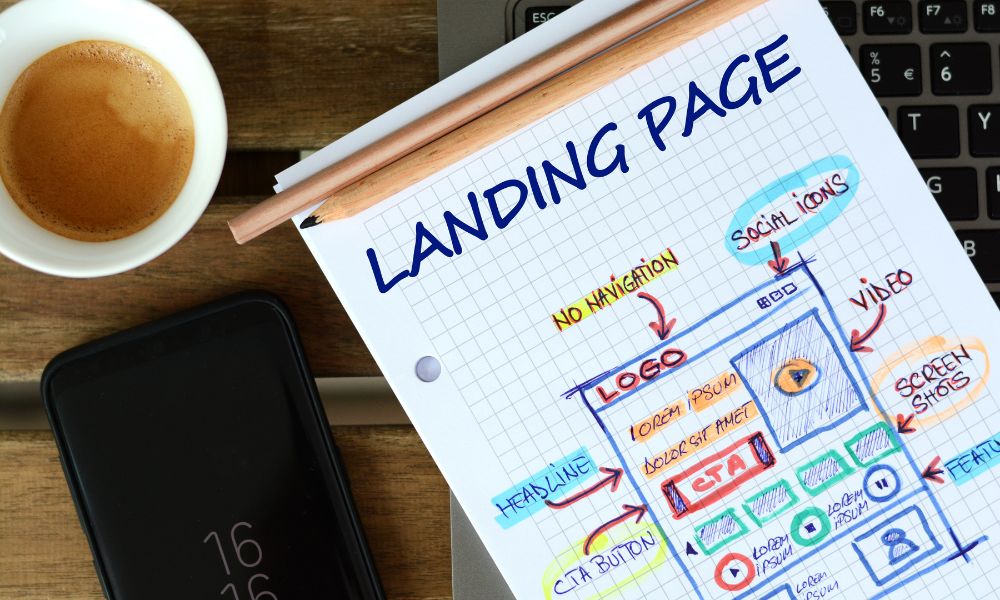
I used to think a landing page had to be designed from scratch, section by section, with me staring at a blank screen and wondering if my headline sounded too boring.
Now, AI landing page generators can give you a first draft in minutes.
But here is the honest part: that does not mean every AI-generated landing page is good.
A free AI landing page generator can help you brainstorm the structure, write the first version of your copy, suggest sections, create a rough design, or even generate a simple page you can publish. But if you use it without strategy, you may end up with a page that looks polished and still does absolutely nothing for your blog.
I am writing this as a blogger who is always looking for new tools to make building websites, business systems, and content workflows easier — especially tools that are low-cost or free. I am also the kind of person who watches what bigger bloggers and online business creators do, not because I have reached those huge monthly numbers myself, but because I want to understand the systems behind them and share the helpful parts with people who are still building.
So this article is not just a list of tools.
It is a practical guide to using a free AI landing page generator the right way: to create faster, test offers sooner, build lead magnets, grow your email list, and stop letting design confusion delay your next move.
If you want a guide about traditional WordPress page builder plugins, that is a slightly different topic. This article is about the AI-first side: prompt-to-page tools, AI copy generators, AI wireframe tools, and AI website builders that can help you create landing page drafts or launch simple pages faster.
What Is a Free AI Landing Page Generator?
A free AI landing page generator is a tool that uses artificial intelligence to help you create landing page copy, structure, design, or full page drafts from a short prompt.
Instead of starting from a blank page, you describe what your page is for. For example:
- A free checklist for beginner bloggers
- A waitlist page for a mini-course
- A landing page for a digital product
- A lead magnet page for Pinterest traffic
- A simple page for an affiliate bonus
- A product idea validation page
Then the tool may generate a headline, subheadline, benefits, call-to-action text, layout sections, design style, images, or even a hosted page.
Some tools are mainly AI copy generators. Others are full AI website builders. Others are design or wireframe tools. This difference matters because the keyword “free AI landing page generator” can mean several things depending on what you actually need.
Quick Answer: Best Free AI Landing Page Generator Options
If you are a blogger and want a fast answer, here is how I would group the tools:
| Tool type | Best tools to consider | Best for | My blogger opinion |
|---|---|---|---|
| Free AI landing page copy generator | HubSpot, Ahrefs | Headlines, sections, page copy, CTAs | Best if you already have WordPress or another builder |
| AI landing page or website generator | Mixo, Wix, Dorik, Durable, Landingsite.ai | Fast page drafts and simple published websites | Great for testing ideas before investing |
| AI design and wireframe generator | Figma Make, Relume, Framer | Layouts, prototypes, wireframes, design direction | Better when you care about structure and design quality |
| AI-powered landing page platform | Unbounce, Landingi | Marketing campaigns, optimization, testing | More serious, but often less “free” long term |
| Simple design-based landing page creator | Canva | Beautiful simple pages, visual freebies, links | Good for quick lead magnet or bio-style pages |
If I were starting with no budget, I would use a free AI tool to generate the first draft of the landing page copy, then publish the page using a free or low-cost builder I already understand. That way, I am not paying for software before I know whether the offer works.
Important: “Free” Does Not Always Mean Free Forever
This is where beginner bloggers need to slow down for a second.
Many AI landing page tools let you start for free, generate a page for free, or test the builder for free. But publishing on a custom domain, removing branding, collecting leads, adding integrations, using advanced analytics, or exporting code may require a paid plan.
That does not make the tool bad. It just means you need to know what you are getting.
Before you build a full page, check:
- Can I publish the page for free?
- Can I connect my own domain?
- Will the page show the tool’s branding?
- Can I collect emails?
- Can I connect my email marketing platform?
- Can I export the page or move it later?
- Does the free version limit views, pages, or submissions?
My personal rule: use free AI landing page generators for brainstorming, drafts, and testing. Upgrade only when the page is connected to something that can actually grow your audience or income.
Why Bloggers Should Care About AI Landing Page Generators
Most bloggers do not fail because they cannot write one more blog post.
Many bloggers struggle because their content has no next step.
A reader finds your article, enjoys it, then leaves. You worked hard for the visit, but you did not capture the relationship.
This is why landing pages matter. They help you turn content into a system.
A simple blogging funnel can look like this:
Helpful article → internal link or content upgrade → landing page → email subscriber → trust → product, affiliate offer, or service.
And this is one of the quiet patterns I notice when I study bigger bloggers and online creators. They are not just publishing content. They are building paths.
If you have an article about Pinterest SEO, you can create a free Pinterest checklist landing page. If you have a guide on AI blog writing, you can create a free AI blog post workflow. If you publish content about affiliate marketing tools, you can offer an affiliate link tracker or comparison sheet.
This is where AI landing page generators can help: not by making you look fancy, but by helping you test these ideas faster.
How This Article Is Different From a WordPress Landing Page Builder Guide
I want to make this difference very clear so you choose the right tool for the right job.
A WordPress landing page builder is usually about building and editing pages inside WordPress. It answers questions like: “Which plugin should I use?” or “How do I build a page on my WordPress site?”
A free AI landing page generator is more about speed, ideas, copy, page structure, and automated drafts. It answers questions like:
- Can AI create my landing page copy?
- Can AI suggest the sections I need?
- Can AI generate a page layout from a prompt?
- Can I test a lead magnet idea quickly?
- Can I create a draft before building it in WordPress?
So the perspective here is different.
This article is not about choosing a WordPress plugin. It is about using AI to move from idea to landing page draft faster, especially when you are a blogger with a limited budget.
Best Free AI Landing Page Generator Tools to Try
1. HubSpot AI Landing Page Generator: Best for Structured Copy
HubSpot offers AI tools that can help generate landing page structure and copy. Its landing page creator GPT is described as a free AI tool that generates a structured, professionally written landing page through prompts. HubSpot also has a campaign assistant landing page copy generator where you can input your topic, tone of voice, and call-to-action to generate page copy.
You can explore HubSpot’s Landing Page Creator GPT and its AI landing page copy generator.
I would use HubSpot when I already know my offer but need help turning it into a clean landing page structure.
For example, if I want to offer a free “AI blog post checklist,” I could use HubSpot to generate the first draft of:
- The headline
- The subheadline
- The benefits
- The call to action
- The page sections
Then I would edit it heavily in my own voice.
My blogger take: HubSpot is helpful when you want better landing page copy, not necessarily when you need a full website design. It is a good first step before building the page in WordPress, Canva, Elementor, or another builder.
2. Ahrefs Free AI Landing Page Generator: Best for Simple Copy Drafts
Ahrefs has a free AI landing page generator that lets you describe your business or product and generate landing page content. You can find it on the Ahrefs free AI landing page generator page.
I like this type of tool for quick copy direction. Sometimes the hardest part is not building the page. It is figuring out what the page should say.
For bloggers, this can help with:
- Freebie landing page copy
- Digital product sales page sections
- Affiliate bonus page messaging
- Course waitlist copy
- Newsletter signup page ideas
But again, I would not publish the output without editing.
AI copy often sounds confident, but not always specific. A good landing page needs your real angle: who it helps, what problem it solves, why it is different, and what the reader gets next.
My blogger take: Ahrefs is useful for fast copy drafts. I would pair it with your own SEO thinking, then build the final page using your preferred platform.
If you are working on SEO content around the landing page, you may also find my guide to AI keyword generator tools useful for finding related phrases and content angles.
3. Mixo: Best for Fast Startup-Style Landing Pages
Mixo is an AI website builder that says it can instantly build a professional website from a description, with a free plan available and no credit card required. You can check the official Mixo AI website builder page or its AI landing page creator.
Mixo is interesting if you want to validate an idea fast.
For example, let’s say you are thinking about creating:
- A mini-course for beginner bloggers
- A digital planner
- A done-for-you content template pack
- A small consulting offer
- A waitlist for a future product
You could use Mixo to generate a simple landing page and see if the idea feels clear before you build a full system around it.
My blogger take: Mixo is better for idea validation and startup-style landing pages than for deep WordPress content sites. I would use it to test an offer, not necessarily to replace my blog.
4. Wix AI Website Builder: Best for Beginners Who Want a Full Website Draft
Wix has an AI website builder that lets users describe their business and generate a custom, editable site. Wix explains that users can describe their vision, have AI build a site, then customize it with drag-and-drop editing and publish. You can see the official Wix AI website builder page.
Wix may be useful if you are not committed to WordPress yet and want a simple all-in-one builder.
But for bloggers who already have a WordPress site, I would be careful. Moving everything to Wix just to use AI may not be necessary. Instead, you can use AI to draft your landing page copy and structure, then publish the final version on your existing site.
My blogger take: Wix AI is friendly for beginners building a new simple site. If you already run a blog on WordPress, use it more for inspiration and comparison unless you intentionally want a separate page or project.
5. Framer AI: Best for Modern Design and Visual Prototypes
Framer has AI features that can generate layouts, create components, translate content, write code, and help improve websites directly on the canvas. You can explore its official Framer AI page.
Framer feels more design-forward than many basic AI page generators. It is useful if you want a modern page that looks like a startup, SaaS, creator brand, or digital product page.
For bloggers, I would consider Framer if you are building:
- A polished digital product landing page
- A tool or template landing page
- A SaaS-style affiliate page
- A creator portfolio page
- A waitlist page for a new offer
My blogger take: Framer is great when design quality matters. But if you only need a simple freebie page, it may be more power than you need at the beginning.
6. Figma Make: Best for AI-Generated Landing Page Concepts
Figma has an AI landing page generator through Figma Make. Its page says you can generate landing pages with AI from idea to interactive, responsive pages, using natural language to describe layouts, sections, and flow. You can check the official Figma AI landing page generator.
This is not the same as a simple publish-and-done website builder. Figma is very useful when you want to design, test, and refine the structure before building the page somewhere else.
For example, if you are creating a high-value sales page, you could use Figma to generate different layout directions before finalizing the copy and building it in WordPress or another platform.
My blogger take: Figma Make is useful when you want landing page design ideas, mockups, or prototypes. It is not always the fastest route if you just need a simple published page today.
7. Relume: Best for Sitemaps and Wireframes Before Design
Relume positions AI as a design ally, not a replacement, and says it can generate sitemaps, wireframes, and style guides for marketing websites in minutes. You can visit Relume to see how it works.
I like Relume’s angle because it does not pretend that AI should replace thinking. It helps with the planning layer.
That matters because a landing page is not just a pretty design. It needs the right sequence.
A good sequence might be:
- Problem
- Promise
- Solution
- Benefits
- Proof
- What you get
- Call to action
- FAQ
My blogger take: Relume is excellent if you want to think like a strategist before you think like a designer.
8. Dorik AI: Best for Simple No-Code Website Pages
Dorik says its AI website builder lets you create a website by describing what you want, using AI to create images, text, and other website parts automatically with no coding or design skills. You can see the official Dorik AI website builder page.
Dorik can be useful for landing pages, simple websites, portfolios, SaaS-style pages, and small business pages. It is especially interesting if you want a no-code builder with AI support but do not want to start from a blank layout.
My blogger take: Dorik is worth testing if you want a simple, clean, no-code page and do not need a full WordPress setup for that specific landing page.
9. Canva: Best for Simple Visual Landing Pages and Freebie Delivery Pages
Canva is not just for graphics anymore. Canva has a free landing page creator and website builder features, and its landing page page explains that you can build pages by dragging and dropping brand logos, fonts, colors, illustrations, vectors, and stock photos, then share a link. You can explore Canva’s landing page creator and Canva website builder.
Canva is good for bloggers who want something simple and visual.
For example:
- A resource page for a free guide
- A portfolio-style page
- A simple bio landing page
- A page for a downloadable PDF
- A quick page for a social media campaign
If your landing page supports a visual freebie, Canva can be very convenient. And if you are creating a downloadable asset, you can connect this workflow with my guide on creating a PDF lead magnet.
My blogger take: Canva is not always the best for advanced funnels, SEO, or deep integrations, but it is very useful when you need something attractive and fast.
10. Landingi: Best for AI Landing Page Creation and Optimization
Landingi describes AI landing page tools that assist with page generation, copy creation and regeneration, SEO content, image background removal, and performance optimization. Its main platform includes a drag-and-drop builder, landing pages, pop-ups, microsites, one-pagers, templates, and A/B testing. You can read more on Landingi’s AI landing page tools and the main Landingi platform.
Landingi is more serious than a simple free copy generator. It is better for marketers who want to launch and optimize landing pages, not just generate copy.
My blogger take: Landingi is worth considering when your landing pages are part of campaigns, paid traffic, or product launches. For a beginner blogger, I would test free and simple options first.
11. Unbounce: Best for Conversion Optimization, Not Just Generation
Unbounce is a landing page platform built for marketers and agencies. Its homepage highlights no-code landing pages, A/B testing, AI copywriting, real-time analytics, and AI optimization. You can visit Unbounce or its Smart Copy AI assistant.
This is not the tool I would suggest to a blogger who only needs one freebie page and has no traffic yet. But if your landing pages are connected to ads, launches, or serious conversion testing, Unbounce becomes more relevant.
My blogger take: Unbounce is more advanced and marketing-focused. It is better when you are ready to optimize, not just create.
My Favorite Free AI Landing Page Workflow for Bloggers
If you are like me and you want to keep costs low, this is the workflow I would use before paying for anything expensive.
Step 1: Start with the offer, not the tool
Do not open ten tools yet.
First, write one sentence:
“This landing page is for people who want ______, and it helps them ______.”
Example:
“This landing page is for beginner bloggers who want to write better AI-assisted posts, and it helps them follow a simple checklist before publishing.”
If you cannot complete that sentence, the problem is not the builder. The offer is still unclear.
Step 2: Use AI to generate the structure
Use HubSpot, Ahrefs, ChatGPT, or another AI writing tool to create the first page structure.
Ask for sections like:
- Hero headline
- Subheadline
- Reader pain points
- Benefits
- What is included
- About the creator
- FAQ
- CTA text
If you need help choosing tools for this writing stage, my guide to best AI writing tools can help you compare options.
Step 3: Rewrite it in your voice
This is where most people skip the important part.
AI can write the first draft, but your audience needs your point of view.
So instead of using generic lines like “Unlock your potential with our powerful solution,” make it specific:
“If you keep using AI to draft blog posts but still feel unsure before hitting publish, this checklist gives you a simple editing path.”
That sounds more human because it speaks to a real feeling.
If you struggle with this step, read my article on how to humanize AI content. The same thinking applies to landing pages.
Step 4: Build the page using the simplest tool that works
You do not always need a full AI website builder.
You can generate the copy with AI, then build the page using:
- WordPress
- Canva
- Elementor
- Framer
- Mixo
- Dorik
- Wix
If you specifically want AI tools inside WordPress, you may like my guides on free AI WordPress website builders and AI WordPress plugins.
Step 5: Add one clear CTA
The call to action should be obvious.
Examples:
- Download the checklist
- Join the waitlist
- Get the free template
- Start the mini-course
- See the tool stack
Do not ask the reader to do five things on one page. A landing page should feel calm and focused.
Step 6: Link to it from relevant articles
This is the step many bloggers forget.
Once the landing page is live, link to it from your related blog posts.
For example:
- An SEO checklist landing page can be linked from best AI SEO tools and SEO prompts for ChatGPT.
- A Pinterest freebie can be linked from Pinterest marketing strategy and Pinterest affiliate marketing.
- A digital product idea tracker can be linked from digital product ideas for bloggers and most profitable digital products.
This turns your blog into a system instead of a folder of disconnected posts.
Prompt Template: Generate a Landing Page With AI
Here is a prompt you can use with ChatGPT, HubSpot, Ahrefs, or another AI writing tool:
Create a landing page for [offer name].

Audience: [describe the reader]
Main problem: [what they are struggling with]
Desired result: [what they want]
Offer: [free checklist, template, mini-course, product, waitlist, etc.]
Tone: helpful, clear, warm, practical, and not hypey
Goal: get visitors to [download / sign up / join / buy]

Create:
1. Hero headline
2. Subheadline
3. Short intro
4. 5 benefit bullets
5. “What you get” section
6. Trust-building note
7. FAQ section
8. 3 CTA button text options
9. Mobile-friendly layout suggestions
10. A simple version for a beginner blogger with no design experience
Then ask a second prompt:
Now make the landing page sound more human and specific.
Remove generic marketing language.
Make it feel like it was written by a blogger who has tested tools herself and wants to help beginners avoid wasting time and money.
This second prompt matters. The first draft gives you structure. The second draft gives you voice.
What Makes an AI-Generated Landing Page Actually Convert?
A landing page does not convert because it was generated by AI.
It converts because the message matches the reader’s need.
Here are the things I would check before publishing.
1. The headline is specific
Bad headline:
“Transform Your Blogging Journey Today.”
Better headline:
“Get the Free AI Blog Post Checklist I Use Before Publishing.”
The second one tells the reader exactly what they get.
2. The page matches the traffic source
If someone comes from a Pinterest pin about AI blog prompts, the landing page should talk about AI blog prompts. If they come from a post about email marketing, the landing page should connect to email growth.
This is why landing pages work best when they are connected to related content, like email marketing strategy tips or types of email marketing campaigns.
3. The CTA is easy to understand
Do not make people think too hard.
Use action text like:
- Get the free checklist
- Download the template
- Join the free training
- Send me the guide
4. The page is mobile-friendly
Always check the landing page on your phone. A page can look beautiful on desktop and feel messy on mobile.
5. The offer is actually useful
No landing page builder can save a weak offer.
If your freebie is vague, your landing page will struggle. If your freebie solves one clear problem, the page becomes much easier to write.
Free AI Landing Page Generator vs AI Website Builder
These two are related, but they are not the same.
| Tool | What it usually creates | Best use case |
|---|---|---|
| AI landing page generator | One focused page or landing page copy | Lead magnets, waitlists, product pages, campaigns |
| AI website builder | A full website or multi-section site | New business site, portfolio, simple brand site |
| AI wireframe tool | Layout and structure | Planning before design or development |
| AI copy generator | Text only | Headlines, CTAs, benefits, FAQ, sales copy |
If you already have a blog, you may not need a full AI website builder. You may only need landing page copy, layout ideas, and a simple place to publish.
When I Would Not Use a Free AI Landing Page Generator
I love free tools, but I would not use them for everything.
I would be careful if:
- The page is for a high-ticket product
- The page needs legal or medical accuracy
- The tool does not let you export your work
- The design looks generic and off-brand
- The page loads slowly
- The free version adds distracting branding
- You cannot connect your email marketing tool
For serious offers, AI can still help, but I would treat it as a first draft, not the final strategist.
Best Landing Page Ideas Bloggers Can Create With AI
If you are wondering what to create first, here are realistic landing page ideas for bloggers:
| Landing page idea | Best for | Possible internal content to support it |
|---|---|---|
| AI blog post checklist | Bloggers using AI to write content | AI blog writing, AI writing tools, humanizing AI content |
| Pinterest SEO checklist | Bloggers using Pinterest for traffic | Pinterest SEO, Pinterest marketing strategy, Pinterest automation tools |
| Affiliate tool stack | Bloggers monetizing with affiliate offers | Affiliate marketing tools, AI affiliate marketing, blog monetization |
| Digital product idea tracker | Bloggers creating products | Digital product ideas, most profitable digital products, create a course with AI |
| SEO prompt pack | Bloggers who need faster optimization | SEO prompts for ChatGPT, best AI SEO tools, AI keyword generator |
If I were choosing one to start with, I would create a landing page for a free AI blog post checklist. It connects naturally to so many helpful articles, including ChatGPT prompts for blog posts, ChatGPT vs Gemini for blogging, and ChatGPT alternatives for content creators.
How to Make AI Landing Pages More Trustworthy
This is where E-E-A-T thinking matters.
Google’s helpful content guidance encourages content that is created for people, demonstrates experience and expertise, and leaves readers feeling satisfied. You can read Google’s official guidance on creating helpful, reliable, people-first content.
For landing pages, I translate that into simple rules:
- Be clear about what the reader gets
- Do not exaggerate results
- Use real examples when possible
- Add an honest “who this is for” section
- Explain what happens after someone signs up
- Use proof only if you actually have it
- Avoid fake urgency
- Make the page useful even before the reader clicks
As a blogger, your advantage is not pretending to be a giant company. Your advantage is being honest, specific, and helpful.
You can say things like:
“I made this checklist because I kept using AI to draft blog posts, but still needed a simple way to check whether the final post felt helpful, human, and optimized.”
That is stronger than generic hype.
My Practical Tool Recommendations
If you want my simple recommendation, here it is.
If you only need copy
Try HubSpot or Ahrefs first.
If you want to test an idea quickly
Try Mixo, Dorik, Durable, or Landingsite.ai.
If you want modern design direction
Try Framer, Figma Make, or Relume.
If you want a simple visual page
Try Canva.
If you are ready for campaign optimization
Look at Landingi or Unbounce.
But do not make the tool the main character.
The real question is: what page will help your reader take the next step?
FAQ: Free AI Landing Page Generator
Can AI create a landing page for free?
Yes, many tools can help you generate landing page copy, structure, wireframes, or simple page drafts for free. However, some tools may require paid plans for publishing, custom domains, removing branding, collecting leads, or advanced integrations.
What is the best free AI landing page generator?
The best free AI landing page generator depends on what you need. For copy, HubSpot and Ahrefs are useful. For fast page drafts, Mixo, Wix, Dorik, and similar AI website builders can help. For design concepts, Framer, Figma Make, and Relume may be better.
Can I use AI landing page copy on my WordPress site?
Yes. You can generate landing page copy with an AI tool, edit it in your own voice, and then add it to a WordPress page using your theme, block editor, or page builder.
Will an AI-generated landing page rank on Google?
A landing page can rank if it is useful, indexable, original, and satisfies search intent. But many landing pages are made for conversion rather than SEO. If you want organic traffic, add helpful content, clear structure, internal links, and avoid thin generic copy.
Should bloggers use AI landing page generators?
Yes, bloggers can use AI landing page generators to move faster, especially for lead magnets, digital products, waitlists, and affiliate bonus pages. The key is to edit the output so it sounds human and matches your audience.
Can I build a landing page without coding?
Yes. Most AI landing page generators and no-code website builders are made for people who do not code. You can generate the page, customize the design, and publish using a visual editor or hosted platform.
Final Thoughts: Use AI to Move Faster, Not to Think Less
A free AI landing page generator can save you from the blank page.
It can help you create a first draft, structure your offer, brainstorm headlines, build a quick page, and test ideas before spending money.
But the best landing pages still need human thinking.
They need your understanding of the reader. Your honest promise. Your real offer. Your calm explanation of why this page is worth someone’s time.
That is what I keep reminding myself while building online. Tools are powerful, but they are not the business. The business is the system you build around them.
If you are a blogger trying to grow with a small budget, start simple. Use AI to draft the page. Edit it until it sounds like you. Publish one clear landing page. Link to it from the right articles. Watch what happens. Improve from there.
You do not need the perfect tool stack to begin.
You need one useful offer, one focused page, and enough courage to test it before everything feels perfect.