
If you have ever spent an afternoon copying data from one app to another, moving leads into a spreadsheet, saving blog ideas manually, or repeating the same publishing checklist every week, you already understand why automation tools are appealing.
They take small, repetitive jobs off your plate.
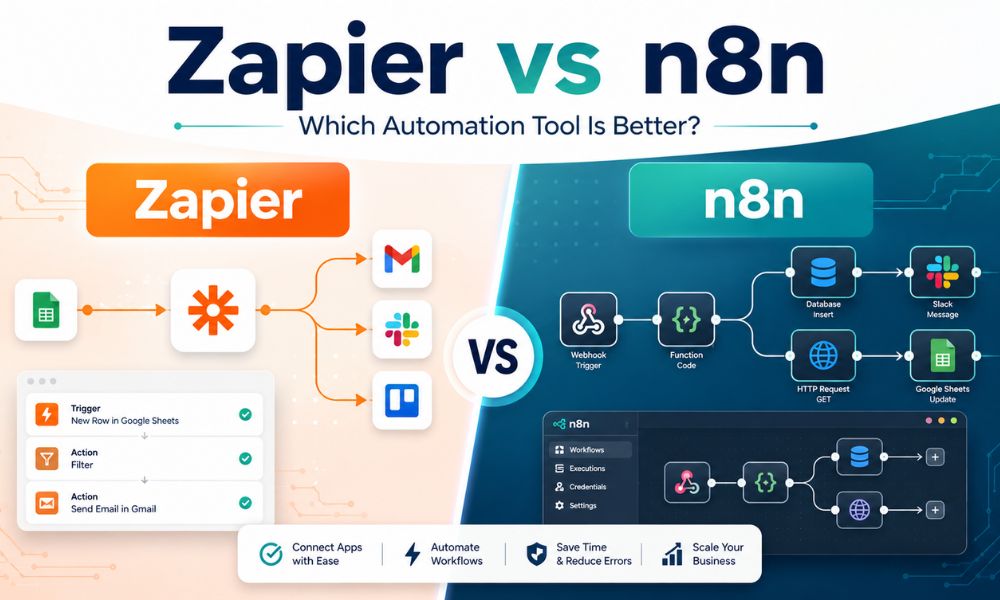
Two tools come up again and again when people start exploring automation: Zapier and n8n. Both connect apps and move information between them, but they feel very different to use.
Zapier is polished, beginner-friendly, and designed to help you get an automation running quickly. n8n offers more control, more flexibility, and a self-hosted option, but it expects more patience and technical confidence from the user.
That is why the Zapier vs n8n comparison is not simply about which tool is “better.” It is about what kind of user you are, what you need to automate, and how much complexity you are willing to manage.
For bloggers and content creators, this matters more than it may seem. A simple workflow could automatically log new WordPress posts in Google Sheets, prepare a content-repurposing checklist or help organize AI-assisted writing ideas. A more advanced workflow could connect your website, email list, AI tools, and social content planning system.
In this guide, I will compare Zapier and n8n based on pricing, ease of use, workflow control, learning curve, and practical use cases. I will also explain which one makes more sense for bloggers, small businesses, and non-technical creators.
If cost is already your main concern, you may also want to read my guide to the best Zapier free alternatives.
What Is Zapier?
Zapier is a cloud-based automation platform that connects apps using automated workflows called Zaps.
A Zap usually begins with a trigger and then performs one or more actions.
For example:
- When a new contact form is submitted, add the details to Google Sheets.
- When a blog post is published, send a notification email.
- When a customer purchases a product, create a follow-up task.
- When a new content idea is added to a sheet, send it to an AI writing tool for drafting support.
Zapier’s main strength is convenience. You do not need to set up a server, understand APIs or write code. You choose the apps, connect your accounts, and follow a guided workflow builder.
According to Zapier’s official website, the platform currently supports 9,000+ apps, which is one of its biggest advantages for small businesses using many different tools.
Key Zapier Features
- More than 9,000 app integrations.
- Simple trigger-and-action workflow setup.
- Ready-made templates for common automations.
- Filters, formatting tools, and conditional paths.
- Multi-step workflows on paid plans.
- Webhooks on paid plans.
- Cloud hosting managed entirely by Zapier.
- AI-assisted workflow building through Zapier Copilot.
Why Beginners Often Start With Zapier
Zapier feels familiar from the first login. The workflow builder asks straightforward questions:
- What app starts the automation?
- What event should trigger it?
- What should happen next?
- Where should the information go?
That simplicity matters when you are already managing a blog, social accounts, a WordPress website or a small business.
For example, if your main goal is to automatically save new subscribers into a spreadsheet or send a notification when a form is submitted, Zapier can make that feel surprisingly easy.
Zapier Pricing: Convenient, but Task Limits Matter
Zapier’s pricing is often where beginners start reconsidering the platform.
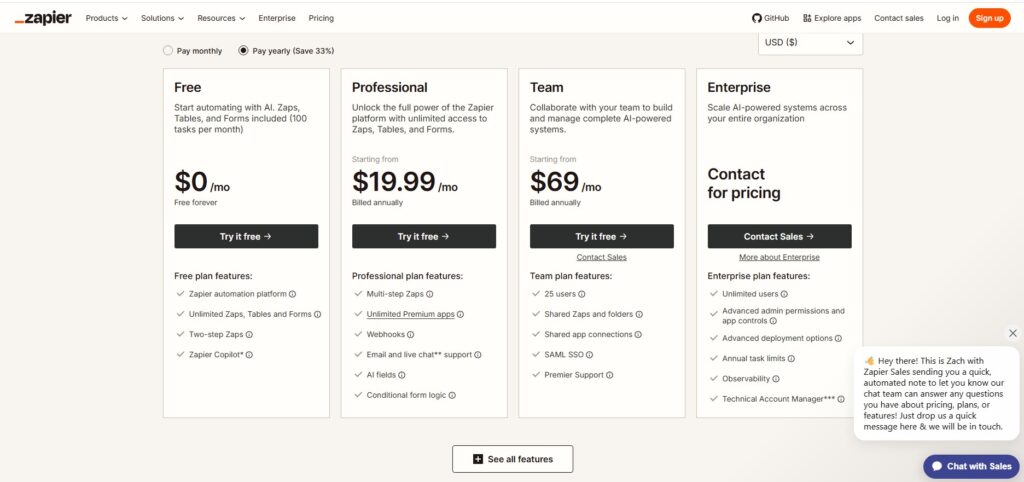
According to the official Zapier pricing page:
- Free Plan: $0/month with 100 tasks per month and two-step Zaps.
- Professional Plan: Starts at $19.99/month when billed annually.
- Team Plan: Starts at $69/month when billed annually.
- Enterprise Plan: Custom pricing.
The important detail is how Zapier counts tasks.
A task is counted each time Zapier successfully completes an action. Triggers do not count as tasks, but each successful action does.
For example, imagine you publish one blog post and your Zap does three things:
- Adds the post to Google Sheets.
- Creates a content-promotion task.
- Sends an email reminder.
That one published article can use three tasks.
This is not necessarily a problem when you are starting small. But if you publish often, collect form submissions or run several workflows, 100 monthly tasks can disappear quickly.
Best For
Zapier is best for:
- Beginners who want to build automations quickly.
- Bloggers use common tools such as WordPress, Gmail, Google Sheets, Notion or Mailchimp.
- Small businesses that value simplicity over maximum control.
- Users who do not want to manage hosting, updates or technical errors.
Not Best For
Zapier may not be ideal for:
- Creators with very limited budgets and high automation volume.
- Users are building complicated workflows with many actions.
- People who want to self-host their automation system.
- Technical users who need deeper logic, custom scripting or greater data control.
What Is n8n?
n8n is a workflow automation platform designed for more flexible, technical and customizable automations.
Like Zapier, it lets you connect apps and trigger actions. But instead of guiding you through a mostly linear workflow builder, n8n gives you a visual canvas where you connect nodes together.
A workflow might include:
- A webhook trigger.
- A WordPress step.
- A filter.
- An AI content-generation step.
- A spreadsheet update.
- An email notification.
- A custom code node.
- An error-handling branch.
This gives you much more freedom, but it also means you need to understand what you are building.
Key n8n Features
- Visual node-based workflow builder.
- 1,784 listed integrations at the time of writing.
- JavaScript and Python code steps.
- Custom API requests using HTTP or GraphQL.
- Webhook and queue triggers.
- Workflow branching and more advanced data handling.
- Cloud-hosted plans.
- A self-hosted Community Edition available through GitHub.
One of the reasons n8n attracts technical users is its self-hosting option. Instead of relying entirely on a hosted automation platform, you can run the Community Edition on your own infrastructure.
That can mean more control over your data and automation environment, but it is important not to treat self-hosting as effortless.
The official n8n hosting documentation states clearly that self-hosting requires technical knowledge, including setting up and securing servers, managing resources and configuring n8n. The documentation recommends n8n Cloud for users who are not experienced with server management.
n8n Pricing: Cloud Convenience or Self-Hosted Control
According to the official n8n pricing page:
- Cloud Starter: €20/month billed annually, with 2.5K workflow executions and unlimited workflow steps.
- Cloud Pro: A higher cloud tier with additional capacity and features.
- Business: €667/month billed annually for larger teams needing collaboration and scale.
- Enterprise: Custom pricing.
- Community Edition: A standard self-hosted version available through GitHub.
The pricing difference between Zapier and n8n is not just the monthly fee. It is also how usage is measured.
Zapier generally counts successful actions as tasks. n8n Cloud counts workflow executions. According to n8n, one execution is one complete run of a workflow, regardless of how many steps it contains.
That distinction can matter if you are building a long workflow.
For example, a workflow that gathers article data, reformats it, creates a draft summary and saves it to a spreadsheet may involve several actions. How those actions affect your allowance differs between platforms.
Best For
n8n is best for:
- Technical bloggers and developers.
- Small businesses need more advanced automation logic.
- Users who want to self-host workflows.
- People are building AI-assisted content workflows with multiple steps.
- Users who are comfortable learning APIs, expressions, or basic code.
Not Best For
n8n may not be ideal for:
- Complete beginners who want results immediately.
- Users who do not want to troubleshoot workflows.
- Creators who do not want responsibility for hosting or security.
- People need the largest possible collection of ready-to-connect apps.
Zapier vs n8n: Ease of Use
Ease of use is where the difference becomes obvious very quickly.
Getting Started With Zapier
With Zapier, you can sign up, choose two apps, and build a simple automation in minutes.
For example:
- Trigger: New WordPress post published.
- Action: Add a row to Google Sheets.
Zapier walks you through the setup, helps test the connection, and shows you what data is being moved.
For beginners, that guided experience is valuable. When you are still learning what automation can do, you do not want to spend the first afternoon worrying about webhooks, servers or data structures.
Getting Started With n8n
With n8n, the experience depends on whether you choose the hosted cloud option or the self-hosted version.
Using n8n Cloud is far easier than self-hosting. You sign in and begin building workflows on the canvas. However, the canvas still assumes that you understand nodes, data connections, and workflow logic.
Self-hosting adds another layer entirely. You need to install and maintain the software, secure the server and deal with technical configuration.
Which One Feels Easier?
For most beginners, Zapier is easier.
For users who enjoy learning systems and want flexibility later, n8n becomes more rewarding over time.
A useful comparison is:
- Zapier feels like filling in a guided form.
- n8n feels like building a flowchart that can become a small application.
Neither approach is automatically better. They are simply designed for different comfort levels.
Zapier vs n8n: Integrations and App Support
Zapier clearly wins when it comes to ready-made app integrations.
Zapier currently states that it supports 9,000+ apps, while n8n’s official integrations directory lists 1,784 integrations.
For bloggers and small business owners, this may or may not matter.
If your workflow uses familiar platforms such as:
- WordPress
- Google Sheets
- Gmail
- Slack
- Notion
- Airtable
- Stripe
- HubSpot
Then both tools may cover what you need.
However, if you use niche tools or smaller software products, Zapier is more likely to have a ready-made integration.
Where n8n Makes Up Ground
n8n may have fewer ready-made integrations, but it gives technical users more flexibility through:
- HTTP requests.
- API connections.
- Custom code nodes.
- Webhooks.
- Data transformation tools.
In plain language: Zapier may already have a button for your app. With n8n, you may still be able to connect the app, but you might need to understand its API first.
For a beginner, that difference is important.
Zapier vs n8n: Workflow Control and Flexibility
This is where n8n becomes attractive.
Zapier Workflow Logic
Zapier is excellent for straightforward workflows:
- New subscriber → Add to spreadsheet.
- New blog post → Send email.
- New order → Create task.
Paid Zapier plans also support more advanced features such as multi-step Zaps, filters, paths and webhooks.
That is enough for many small businesses.
n8n Workflow Logic
n8n is better suited for workflows with complicated decision-making.
For example:
- If a published post belongs to the AI Tools category, create a Pinterest task.
- If the post has no meta description, notify the editor.
- If the post includes a product comparison, send it into an AI summary step.
- If the output meets your conditions, save it to Google Sheets for manual review.
With n8n, this type of branching and data handling feels more natural once you understand the platform.
,This may be especially useful if your content system includes AI-assisted writing, research, or repurposing. You could, for example, use automation to organize drafts while still keeping the final editing human. For more on that process, see AI Blog Writing: How to Create Helpful Articles Without Sounding Robotic.
Practical Example: Automating a Blogger’s Content Workflow
Let us make this comparison practical.
Imagine you publish a new WordPress article and want to track it for future promotion.
The Workflow
- A new post is published on WordPress.
- The title, URL, and publish date are saved to Google Sheets.
- A reminder is created to design Pinterest Pins.
- The post is added to a list for future content updates.
- An AI tool drafts possible social captions for you to review.
Building It With Zapier
Zapier may be easier to set up initially because it guides you through each app connection.
This works well if:
- The workflow is relatively short.
- You want to avoid technical setup.
- You are comfortable monitoring task usage.
- You prefer convenience over customization.
Building It With n8n
n8n may be better once the workflow becomes more detailed.
You might want to:
- Add different paths based on the post category.
- Use custom rules for AI content generation.
- Store outputs in different sheets.
- Add error handling.
- Self-host the whole process.
For bloggers already experimenting with content systems, these related guides may also be helpful:
- Best AI Tools for Bloggers
- Best AI Writing Tools
- Best AI SEO Tools
- ChatGPT Alternatives for Content Creators
The important point is that automation should support your content process, not publish unreviewed material automatically. AI can prepare drafts or ideas, but you should still review titles, claims, links, and descriptions before anything goes live.
Zapier vs n8n: Webhooks, Polling and Real-Time Workflows
This is one area that often confuses beginners.
What Is Polling?
Polling means the automation tool checks an app on a schedule to see whether something new has happened.
For example, it may check WordPress regularly to see whether you published a new post.
Polling is usually fine for:
- Editorial tracking.
- Updating spreadsheets.
- Saving content ideas.
- Creating non-urgent reminders.
What Is a Webhook?
A webhook sends data immediately when an event happens.
For example, a contact form may send a new lead directly into your automation tool as soon as the form is submitted.
Webhooks are useful when timing matters, such as:
- Customer enquiries.
- Orders.
- Payments.
- Lead notifications.
- Urgent support requests.
Zapier provides webhooks as part of its paid Professional features. n8n includes webhook triggers among its workflow developer tools.
For a blogger simply tracking published posts, real-time execution may not matter. For a business handling customers, it often does.
Zapier vs n8n for Bloggers: Which One Fits Your Content System?
Choose Zapier If You Want Simplicity
Zapier is likely the better fit if you:
- Are new to automation.
- Want to connect common apps quickly.
- Prefer step-by-step setup.
- Do not want to manage a server.
- Only need simple content or admin workflows.
A blogger could use Zapier to:
- Log new articles.
- Save contact form entries.
- Add newsletter subscribers.
- Create simple reminders.
- Organize content tasks.
Choose n8n If You Want Control
n8n is likely the better fit if you:
- Enjoy building systems.
- Need more advanced logic.
- Want to connect APIs manually.
- Are interested in self-hosting.
- Plan to build multi-step AI or content workflows.
A more technical blogger could use n8n to:
- Create approval-based AI drafting workflows.
- Organize content refresh systems.
- Route posts by category.
- Prepare Pinterest copy drafts.
- Connect several internal tools with custom logic.
Choose Neither Yet If Your Workflow Is Still Messy
One mistake I see often is trying to automate a process that has not been clearly defined.
If you are still deciding how to publish content, where you store ideas or how you repurpose blog posts, automation may simply create another layer of confusion.
First, create a repeatable process. Then automate the repetitive parts.
Developer Automation vs Content Automation
If you are reading about n8n because you are interested in more technical automation, it is useful to understand that not every automation tool solves the same problem.
Zapier and n8n mainly connect apps and workflows.
Jenkins, on the other hand, is commonly used in software development workflows to automate processes such as building, testing, and deploying code.
A blogger using WordPress and spreadsheets probably does not need Jenkins. But if your interest in automation is growing into website development, application deployment or technical projects, understanding the difference can save you from choosing the wrong type of tool.
My Honest Take: Zapier or n8n?
I understand why people like Zapier.
The first time you connect two apps and watch information move automatically, it feels almost too easy. You do not need to understand much about the technical side. For a beginner trying to save time, that experience matters.
But task limits can become frustrating as your workflows grow. Once every article, form submission, or customer action triggers several steps, you may start paying more than expected or worrying about monthly usage.
n8n gives you a different feeling. It is less polished at the beginning. The first workflow can take longer, and the self-hosting option is not something I would casually recommend to someone who has never managed a server.
But once you understand it, n8n gives you far more room to customize your workflows. For people building serious systems or experimenting with more detailed AI automation, that flexibility can be worth the learning curve.
My practical recommendation is simple:
- Start with Zapier when you want the quickest beginner experience.
- Try n8n Cloud when you want more flexible workflows without self-hosting immediately.
- Consider n8n Community Edition only when you are comfortable managing the technical side.
- Read the best Zapier free alternatives if pricing limits are the main reason you are comparing tools.
Common Mistakes to Avoid
1. Assuming One Automation Run Uses Only One Task
With Zapier, successful actions count as tasks. A workflow with several actions can use several tasks each time it runs.
Before relying on a workflow, estimate how many times it may run per month and how many actions happen each time.
2. Choosing Self-Hosting Only Because It Sounds Free
n8n’s Community Edition is available as a self-hosted option, but hosting still involves responsibility.
You may need to manage:
- Server setup.
- Security.
- Updates.
- Backups.
- Downtime.
- Troubleshooting.
Choose self-hosting because you want control and understand the responsibility, not only because the software itself has no subscription cost.
3. Automating AI Content Without Reviewing It
AI can help draft captions, summaries, outlines and content ideas. It should not automatically publish important content without your review.
For more guidance on keeping AI writing natural and useful, read:
- AI Blog Writing: How to Create Helpful Articles Without Sounding Robotic
- ChatGPT vs Gemini for Blogging
4. Ignoring Workflow Errors
Connections expire. APIs fail. Fields change. Data arrives in an unexpected format.
Set up notifications when possible, check failed workflow logs and test your automation with real data before trusting it.
5. Building Five Workflows Before One Works Properly
Start small.
A simple first workflow could be:
New WordPress post published → Add title and URL to Google Sheets.
Once that works reliably, expand it slowly.
Conclusion: Zapier vs n8n Comes Down to Simplicity or Control
The Zapier vs n8n choice is not about one tool defeating the other.
Zapier is easier to begin with, supports a much larger number of ready-made app integrations and is a sensible choice for beginners who value convenience.
n8n offers greater flexibility, more control and a self-hosted Community Edition for users willing to manage the technical side. It is a strong option for more complex workflows, custom data handling and AI-assisted automation systems.
For most beginner bloggers, Zapier is the easier first step. For creators who have outgrown simple workflows or want more control, n8n is worth exploring.
Whichever tool you choose, begin with one real problem:
- Tracking newly published WordPress posts.
- Saving content ideas.
- Organizing Pinterest promotion tasks.
- Managing leads.
- Preparing AI-assisted drafts for review.
Automation should make your content work lighter and clearer — not create another system you have to fight with every week.