

Teachable Platform Review for Bloggers
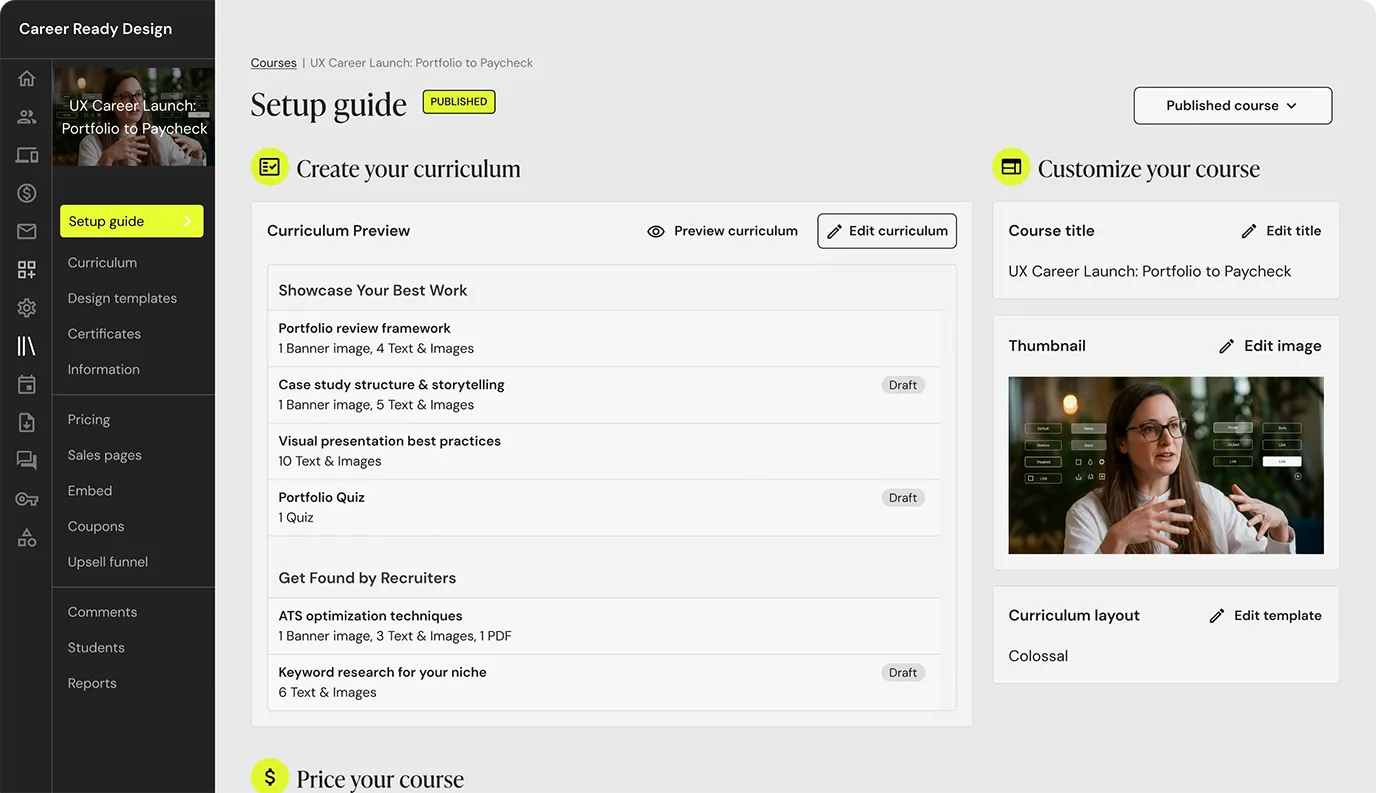
Let me be honest: choosing an online course platform is one of those blogging tasks that looks simple until you actually start comparing platforms.
At first, I thought the hard part would be creating the course itself.
But then I started looking at platforms.
Teachable. Podia. Thinkific. Systeme.io. Payhip. Kajabi. LearnWorlds.
Every platform says it is easy. Every platform says it helps you sell. Every pricing page looks fine for about 10 seconds, until you notice monthly fees, transaction fees, product limits, feature limits, payment processing fees, or some “you only get this on the higher plan” situation.
And as a blogger, that is exactly where my brain goes:
- Do I really need this platform right now?
- Will I actually use all these features?
- Is this too expensive for a first course?
- What if I pay monthly and the course does not sell?
- Should I start cheaper and upgrade later?
That is the mindset I am using in this Teachable platform review.
I am not reviewing Teachable like a giant course company with a huge launch budget. I am looking at it like a blogger who wants to turn knowledge into a product, keep costs under control, avoid tech chaos, and choose a platform that actually makes sense for the stage I am in.
So if you are wondering whether Teachable is worth it for your first course, your next digital product, or your future creator business, this review will walk through what Teachable does, what it costs, what feels useful, what feels expensive, and when I would choose it over cheaper alternatives.
If you are still deciding whether courses are even the right product for your blog, my guide on most profitable digital products can help you compare courses with templates, ebooks, workbooks, memberships, prompt packs, and spreadsheets before committing to a platform.
What Is Teachable?
Teachable is an online platform that helps creators build and sell digital learning products.
Most people know Teachable as an online course platform, but it is not only for courses anymore. Teachable’s support documentation lists several product types you can create, including courses, digital downloads, memberships, coaching, and community products. It also lets creators bundle products together. :contentReference[oaicite:1]{index=1}
That matters because many bloggers do not only want to sell one course.
You might want to build a product ladder, like:
- A free lead magnet
- A $17 digital download
- A $47 mini-course
- A $97 course
- A $19/month membership
- A coaching offer later
Teachable can support more of that creator-business structure, which makes it more flexible than a simple “upload video lessons and call it a day” platform.
Teachable’s own course page positions the platform as a way to create and sell online courses without the tech headache, which is exactly the kind of promise that attracts bloggers who do not want to build a complicated learning system from scratch. :contentReference[oaicite:2]{index=2}
Why Bloggers Look at Teachable in the First Place
For bloggers, Teachable becomes interesting when your content starts turning into something teachable.
Maybe you have written several blog posts on one topic and realize people need a step-by-step path.
Maybe you keep answering the same reader questions again and again.
Maybe your audience wants help with Pinterest, SEO, AI writing, digital products, YouTube content, or email marketing.
At some point, a course starts to make sense because it turns scattered free content into a guided transformation.
For example, if your blog talks about AI and content creation, you could create courses like:
- How to write your first AI-assisted blog post
- How to create faceless YouTube videos from blog posts
- How to build a lead magnet with AI
- How to create Pinterest content faster
- How to launch your first digital product
These course ideas could naturally connect to articles like YouTube channel ideas without showing your face or voice or Lumen5 alternative, especially if you teach creators how to repurpose content into video.
This is where Teachable can help: it gives you a place to organize that teaching into a real product instead of leaving everything scattered across blog posts, PDFs, and YouTube links.
Teachable Pricing: The Part I Would Check First

Before I fall in love with any platform, I always check pricing.
Not because the cheapest tool is always best.
But because beginner bloggers need to protect cash flow.
If you have not sold your first course yet, a monthly platform fee can feel heavy. And if the lower plan has transaction fees, you need to understand how much that could cost once sales start.
Teachable’s current pricing page states that the Starter plan has a 7.5% transaction fee. It also says Builder, Growth, and Custom plans have 0% transaction fees when using Teachable payment gateways, though standard payment processing fees may still apply. :contentReference[oaicite:3]{index=3}
This is the first thing I would calculate before choosing Teachable.
A 7.5% platform transaction fee might be okay if you are testing your first course and sales are small. But if your course starts selling consistently, that fee can become noticeable quickly.
Simple Teachable fee example
| Monthly Course Sales | 7.5% Starter Transaction Fee | What I Would Think |
|---|---|---|
| $200 | $15 | Not too painful for early testing. |
| $500 | $37.50 | Still manageable, but worth tracking. |
| $1,000 | $75 | Now I would compare upgrade costs. |
| $2,000 | $150 | The fee becomes hard to ignore. |
| $5,000 | $375 | I would not stay on a fee-heavy plan casually. |
This does not mean Teachable is bad.
It means the Starter plan is probably best for testing, while more serious sellers should compare whether a higher plan saves money in the long run.
That is how I like to think about platform pricing: not only “How much is the monthly plan?” but “What is the real cost when sales grow?”
What You Can Sell on the Teachable Platform
Teachable is not only for big online courses.
That is something I think bloggers should pay attention to.
Teachable supports several product types, including courses, digital downloads, memberships, coaching, and communities. :contentReference[oaicite:4]{index=4}
This means you could use Teachable to sell:
- Mini-courses
- Full courses
- PDF guides
- Workbooks
- Templates
- Coaching packages
- Membership access
- Community-based products
- Product bundles
Teachable also has a page for selling digital downloads, where it mentions that creators can upload files directly or link to spaces like Canva, Google Drive, or Notion, and bundle downloads with courses, memberships, or coaching products. :contentReference[oaicite:5]{index=5}
This is useful for bloggers because the smartest course business is often not one product.
It is a product ladder.
For example:
- Free: Blog post checklist
- $9: Content planning worksheet
- $27: Notion content calendar
- $97: Mini-course
- $197: Full course
- $29/month: Resource membership
That type of ladder can work well if your blog already teaches a topic and your audience needs different levels of help.
If you are not sure what to sell before creating a course, I would read my article on most profitable digital products first, because a course is not always the easiest first product.
Creating a Course on Teachable: What I Like About the Idea
The biggest reason I would consider Teachable is that it feels course-first.
Some platforms feel like simple checkout tools that added courses later. Teachable feels like it was built around teaching and selling knowledge products.
For bloggers who want to turn content into structured learning, that matters.
A good course platform should help you organize your course into:
- Sections
- Lessons
- Videos
- Downloads
- Quizzes or assessments
- Student access
- Checkout and payment
- Sales pages
And this is where Teachable starts to feel stronger than a basic download platform.
If I were creating a mini-course, I would keep it simple:
- Lesson 1: The result we are creating
- Lesson 2: Tools needed
- Lesson 3: Step-by-step walkthrough
- Lesson 4: Mistakes to avoid
- Lesson 5: Final checklist
- Bonus: Template or workbook
That is enough for a first course.
I would not create a 40-lesson monster course before validating demand.
And this is important: Teachable may be a strong platform, but the platform does not validate your idea for you.
You still need a course people actually want.
The Blogger Pain Point: Teachable Feels Professional, But Is It Too Much Too Soon?
This is the question I kept coming back to.
Teachable looks professional. It has real course-selling features. It can support more than courses. It has a trusted name in the creator space.
But if I am a beginner blogger with no course sales yet, do I need Teachable immediately?
Maybe.
Maybe not.
That depends on your stage.
I would think about it like this:
- If I am only testing a tiny $17 product, Teachable may be more than I need.
- If I am building a serious course business, Teachable becomes more interesting.
- If I want to sell downloads, coaching, memberships, and courses together, Teachable deserves a closer look.
- If I need the absolute lowest-cost start, I would compare free or no-monthly-fee platforms first.
This is why I do not like one-size-fits-all platform recommendations.
The best platform is not always the one with the biggest brand name. It is the one that matches your current stage, your budget, and your product plan.
If you are still in the “I just want to create and host a course for free or with no monthly fee” stage, my guide on best free online course builder may be a better starting point before choosing Teachable.
Teachable Pros: What I Like About the Platform
After looking closely at Teachable, these are the things I think make it attractive for bloggers and creators.
1. It feels built for selling knowledge
Teachable is not just a random checkout page.
It is built around courses, learning products, coaching, memberships, and communities.
That makes it a better fit if your blog is moving from free content into paid education.
2. You can sell more than one product type
I like that Teachable supports courses, downloads, memberships, coaching, and community products. :contentReference[oaicite:6]{index=6}
This means your business can grow beyond one course.
You can test a digital download, then add a course, then later add coaching or a membership.
3. Built-in payments and checkout are useful
One of the biggest headaches with selling online is payments.
Teachable’s checkout and payment system can reduce some of that stress because the platform is designed for selling digital learning products.
For bloggers who do not want to build complicated checkout pages on WordPress, this can be a big advantage.
4. It can look more professional than a basic setup
If you are selling a higher-priced course, presentation matters.
Students want to feel like the course is organized and easy to access.
A dedicated course platform can feel more professional than sending people a folder of videos or a PDF full of links.
5. Bundles can help increase value
Teachable support documentation mentions bundle collections, which can let you sell combinations of product types together. :contentReference[oaicite:7]{index=7}
For bloggers, this is useful.
You might bundle:
- A course + workbook
- A template pack + mini-course
- A digital download + coaching session
- A membership + resource library
Bundles can make your offer feel more complete and can help increase average order value.
Teachable Cons: What I Would Watch Carefully
No platform is perfect, and Teachable has a few things I would think about carefully before paying.
1. The Starter transaction fee can add up
The 7.5% transaction fee on the Starter plan is the biggest thing I would watch. :contentReference[oaicite:8]{index=8}
Again, this may be fine for early testing. But if your course starts selling, you need to calculate whether upgrading saves money.
I would not ignore this just because the monthly plan looks more affordable.
2. It may not be the cheapest first step
If you are creating your first mini-course and have no sales yet, Teachable might feel like a bigger commitment than you need.
Platforms like Payhip or Systeme.io may be more comfortable if your main priority is low-cost testing.
3. You still need traffic
This is not Teachable’s fault, but it is important.
Teachable gives you a place to sell the course. It does not automatically bring buyers.
You still need a marketing system: blog posts, SEO, Pinterest, YouTube, email list, affiliate partners, or paid ads.
If you are creating content around faceless YouTube or video marketing, your course could connect naturally to articles like YouTube channel ideas without showing your face or voice and Lumen5 alternative, but you still need to create those traffic paths intentionally.
4. Advanced features may require higher plans
Like most platforms, the best features are usually not all on the lowest plan.
That is normal, but it means you should check the pricing page carefully before building your whole course plan around a feature that may require an upgrade.
Teachable Pricing Calculator: When Does Starter Stop Making Sense?
Here is a simple way I would think about the Starter transaction fee.
The formula is:
Monthly Teachable Starter Transaction Fee = Monthly Sales × 7.5%
So if your course earns $1,000/month:
$1,000 × 7.5% = $75 platform transaction fee
That is before standard payment processing fees.
At low sales volume, it may be acceptable. At higher sales volume, it becomes a serious cost.
This is why I would treat the Starter plan as a testing plan, not necessarily the forever plan.
Teachable vs Podia
If I were comparing Teachable with Podia, I would think about the type of business I am building.
Teachable feels more course and learning-product-focused.
Podia feels more like a creator storefront for courses, downloads, memberships, email, and digital products in one simpler package.
If courses are the center of the business, Teachable may be stronger.
If I want a simpler creator store with multiple product types and email marketing in one place, Podia may be worth comparing.
You can read my full Podia platform review if you want to compare both from a blogger’s perspective.
Teachable vs Systeme.io
Systeme.io is the option I would look at if cost is the biggest concern.
It offers course hosting, funnels, email marketing, automations, and selling tools in one platform, and its pricing page says it has 0% transaction fees on all plans.
Teachable may feel more polished for course delivery, but Systeme.io may feel more beginner-budget-friendly if you need funnels and email marketing without paying for separate tools.
If I were only testing my first small course, I would compare Systeme.io before choosing Teachable.
This is also why my article on best free online course builder is useful if your current goal is to avoid unnecessary monthly costs.
Teachable vs Payhip
Payhip is simpler than Teachable.
It is a good option if you want to sell courses, downloads, memberships, or digital products without a monthly fee.
Teachable is more course-business focused. Payhip is more simple-selling focused.
If I were selling a $17 workbook or a small template pack, I would probably look at Payhip first.
If I were building a more serious course with structured lessons and a stronger student experience, I would compare Teachable more seriously.
Who Should Use Teachable?
Teachable may be a good fit if:
- You want to sell structured online courses.
- Your course idea is already validated or close to being validated.
- You want a more professional student experience.
- You plan to sell courses, downloads, coaching, memberships, or bundles.
- You are comfortable paying for a platform once the business is serious.
- You want a platform built around knowledge products.
Teachable may not be the best fit if:
- You need a free forever platform.
- You are still testing whether anyone wants your first product.
- You only need to sell one simple PDF or template.
- You are very sensitive to transaction fees.
- You want the lowest-cost possible launch setup.
How I Would Use Teachable as a Blogger
If I decided to use Teachable, I would not start by building the biggest course I can imagine.
I would start with one clear transformation.
Something like:
- Build your first lead magnet in one weekend
- Create your first AI-assisted blog post
- Launch your first digital product
- Create faceless YouTube videos from blog content
- Set up a simple Pinterest traffic system
Then I would build the product ladder around it:
- Free checklist
- Low-cost template
- Mini-course
- Bundle
- Coaching or membership later
This way, Teachable becomes part of a content business, not just a place where a course sits quietly waiting for sales.
I would also make sure every related blog post supports the course. For example, a course about AI content creation could be connected to posts on AI writing, content repurposing, faceless YouTube, and video tools.
Common Mistakes Bloggers Make With Teachable
Choosing Teachable before validating the course idea
A platform cannot fix an offer that nobody wants.
Before paying for a platform, I would validate the course topic with blog traffic, email subscribers, audience questions, or a small beta offer.
Building too many lessons
More lessons do not always mean more value.
Students want a result. A focused 5-lesson mini-course can be more useful than a 50-lesson course that overwhelms them.
Ignoring fees
Monthly fees and transaction fees both matter.
Always calculate the real cost at different sales levels before choosing a plan.
Not building traffic first
Teachable hosts and sells your course, but it does not magically create demand.
You still need content, SEO, Pinterest, YouTube, email marketing, or another traffic system.
Forgetting the email list
An email list can turn casual readers into buyers.
If you do not have one yet, start with a free lead magnet. My guide on lead magnet ideas can help you create something that fits your future course topic.
Final Verdict: Is Teachable Platform Worth It?
Teachable platform can be worth it if you are serious about selling online courses and knowledge products.
It gives you a more professional course-selling environment than a basic checkout tool, and it supports multiple product types like courses, digital downloads, memberships, coaching, and community. :contentReference[oaicite:9]{index=9}
But I would not call it the cheapest starting point for every beginner blogger.
If your course idea is still untested, I would compare lower-cost options first or validate the product with a smaller offer.
If you already know your audience wants the course, and you want a platform that feels more serious and organized, Teachable becomes much more interesting.
My honest blogger take is simple:
Use Teachable when your course is becoming a real business asset, not just an idea you are still unsure about.
For the earliest testing stage, keep your costs low.
For the growth stage, choose the platform that helps you deliver a better student experience, sell more confidently, and build a product ladder around your blog.
That is where Teachable can make sense: not as the cheapest tool, but as a stronger home for bloggers who are ready to treat courses as a serious part of their creator business.