
There’s a whole category of software tools that developers use every single day — tools that quietly run in the background, doing repetitive jobs so humans don’t have to. Most people outside of tech teams have never heard of them. Jenkins is one of those tools.
If you’ve ever wondered how a company’s website magically updates after a developer saves a file, or how software gets tested and shipped without someone manually clicking through every step, that invisible process usually has a name. Sometimes that name is Jenkins.
So, what is Jenkins, exactly? In the simplest terms, it’s a free automation server that handles the repetitive, error-prone parts of building and deploying software. It’s been around since 2004, it powers hundreds of thousands of projects worldwide, and it’s genuinely one of the most important tools in modern software development.
And yet, most bloggers, content creators, and small website owners have never come across it. That’s not necessarily a bad thing — but understanding what Jenkins does, who it’s for, and when you might actually need it is worth your time, even if you’re not a developer.
In this article, I’m going to break down Jenkins in plain English. We’ll cover what it actually does, how it works in practice, who uses it (and who probably shouldn’t bother), how it compares to popular alternatives, and whether any of this is relevant to you as someone running a website or creating content online. No jargon dumps. No, assuming you already know what a pipeline is. Let’s just talk through it.
What Is Jenkins, Really?
Think of Jenkins like an assembly line manager for software. Imagine a factory floor where, every time a worker finishes their piece of a product, the manager automatically checks the work, sends it to the next station, runs quality tests, and ships the finished item — all without anyone having to manually coordinate each step. That’s essentially what Jenkins does, but for code.
More technically:
Jenkins is an open-source automation server. It watches for changes in your code, and when it detects one, it automatically triggers a series of tasks you’ve pre-defined — things like building the software, running tests, and deploying updates to a live server. The whole goal is to catch problems early and ship reliable software faster.
This falls under what developers call CI/CD, which stands for continuous integration and continuous delivery. Here’s the one-paragraph version: CI means every time someone on a team adds new code, that code gets automatically tested right away, so bugs don’t pile up unnoticed. CD means once the code passes those tests, it gets automatically prepared (or even fully deployed) for release. Jenkins is one of the most widely used tools for making both of those things happen.
A few things that make Jenkins stand out:
- It’s completely free. Open source, no licensing fees, no premium tiers.
- It’s been around since 2004. Originally built by Kohsuke Kawaguchi at Sun Microsystems under the name Hudson, it was later forked by the community and renamed Jenkins. That’s nearly two decades of development and trust-building.
- It has over 1,800 community plugins. Git, Docker, AWS, Slack, GitHub — if you need Jenkins to talk to something, there’s almost certainly a plugin for it.
- It runs on over 165,000 active installations worldwide, serving roughly 1.65 million users.
It’s not flashy. It doesn’t have a slick marketing site. But it’s deeply embedded in how the software world operates.
How Jenkins Actually Works (The Simple Version)
Say you have a simple website. A developer pushes code changes to GitHub. Here’s what happens with Jenkins:
- Step 1 — Jenkins detects the change. Jenkins is watching that GitHub repository. The moment new code lands, Jenkins gets a notification and swings into action.
- Step 2 — Jenkins runs your defined steps. This is where a Jenkinsfile comes in. A Jenkins file is a text file that lives inside your project and tells Jenkins exactly what to do — in what order, under what conditions. It’s written in a scripting language called Groovy — essentially your instruction manual for Jenkins.
Typical steps:
- Build — Compile or package the code so it’s ready to run
- Test — Automatically run a suite of tests to check that nothing is broken
- Deploy — Push the update to your live or staging server
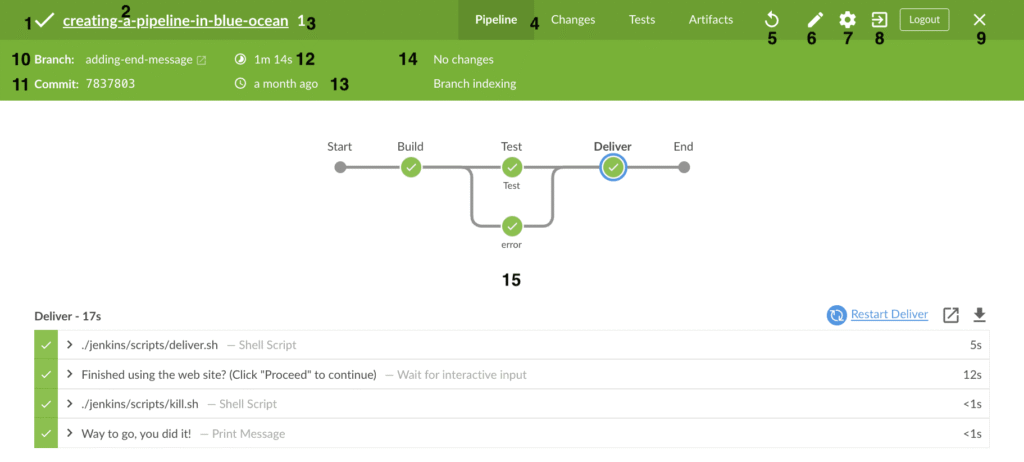
- Step 3 — Jenkins tells you what happened. If everything passed, great — your update is live. If something broke in the test phase, Jenkins stops the process and notifies your team (via email, Slack, whatever you’ve configured) before anything broken reaches real users.
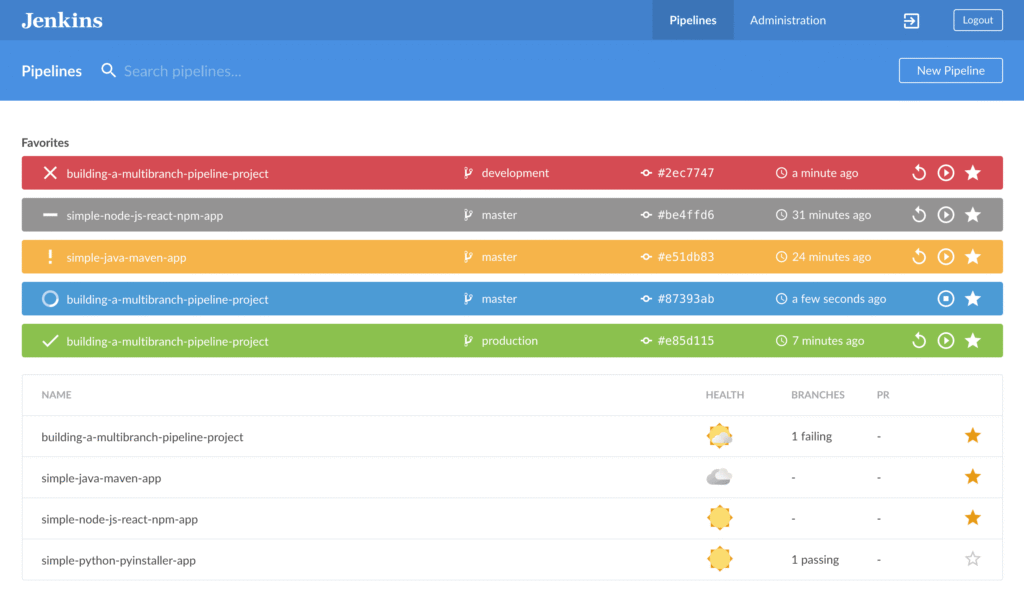
That whole sequence is called a pipeline — a set of automated steps that your code travels through from start to finish.
The plugin ecosystem is what makes Jenkins flexible enough to fit almost any setup. Need it to pull code from GitHub? Plugin.
Need it to build a Docker container? Plugin. Need Slack notifications? Plugin. It’s endlessly customizable, which is both its biggest strength and, honestly, part of why the learning curve can feel steep.
Jenkins runs on your own server — what’s called self-hosted infrastructure. You control everything. But that also means you’re responsible for setting it up, keeping it updated, and fixing it when something goes sideways. That trade-off matters a lot depending on who you are.
Who Actually Uses Jenkins (and Who Doesn’t)
Who Jenkins is genuinely built for:
Jenkins shines in enterprise environments and mid-to-large software development teams. Think companies with dedicated DevOps engineers, complex deployment pipelines, multiple environments (development, staging, production), and teams where dozens of people are pushing code changes every day. Banks, tech companies, SaaS businesses, e-commerce platforms — these are the natural homes for Jenkins.
It also makes sense if you have strict self-hosting requirements. Some organizations can’t send their code through third-party cloud services for security or compliance reasons. Jenkins runs entirely on your own infrastructure, so your code never leaves your control.
If you’re a developer or a small team with genuine automation needs and the technical chops to configure it, Jenkins is a powerful, free option worth exploring.
Who probably doesn’t need Jenkins:
Bloggers? Small website owners? Content creators running a WordPress site or a Squarespace page? Almost certainly not.
If you’re updating your website by clicking buttons in a dashboard, you don’t have a deployment pipeline. You don’t need one. Jenkins would be like buying industrial welding equipment to hang a picture frame.
Even if you’re a bit more technical — maybe you manage a small site with a developer friend, or you use a simple hosting platform — the overhead of setting up and maintaining Jenkins is rarely worth it at that scale. The setup alone requires server configuration, Java installation, plugin management, and Groovy scripting. That’s before you’ve automated a single thing.
I’ve seen small teams get excited about Jenkins, spend two weekends getting it running, and then barely use it. Simpler tools often serve better when the complexity isn’t there to justify it.
Jenkins vs. The Alternatives: An Honest Comparison
Jenkins isn’t the only CI/CD option — and depending on your situation, it might not be the best one.
GitHub Actions
If your code already lives on GitHub, GitHub Actions is where I’d tell most people to start. It’s built directly into GitHub, the setup is dramatically simpler, and for most projects it’s free. You write workflows in YAML files, and GitHub handles the infrastructure. The main limitation is that it’s tied to the GitHub ecosystem — if you’re somewhere else, it’s less useful. But for individuals and small teams? It’s hard to beat for ease of entry.
CircleCI
CircleCI has a reputation for being fast and developer-friendly. It’s cloud-hosted, has a solid free tier, and integrates well with GitHub and Bitbucket. I’d describe it as a middle ground — more powerful than GitHub Actions for complex workflows, but far less painful to set up than Jenkins. Good choice for growing engineering teams who want speed without the self-hosting headache.
GitLab CI
If you’re using GitLab as your code platform, GitLab CI/CD is built right in, and it’s genuinely excellent. It’s an all-in-one platform — code hosting, CI/CD, issue tracking — which some teams love and others find too locked-in. For teams already on GitLab, it’s an obvious first choice.
Travis CI
Travis CI used to be the go-to for open-source projects, and it’s still around. It’s simpler than Jenkins and reasonably beginner-friendly. That said, its free tier got significantly more limited a few years back, which pushed a lot of users toward GitHub Actions. It’s not a bad tool, but it’s harder to recommend as a starting point today.
The honest summary: For most beginners and small teams, GitHub Actions is the practical starting point. Jenkins earns its place when you need deep customisation, full infrastructure control, or you’re operating at a scale where the setup cost is justified.
In Part 2, we’ll get into the practical side — how to decide if Jenkins is worth exploring for your situation, common mistakes people make when getting started, and an honest take on whether the learning curve is actually worth climbing.
Getting Started with Jenkins: What It Actually Takes
I won’t sugarcoat this: Jenkins is not a click-and-go tool.
Before you even open Jenkins for the first time, you need Java installed on your machine — because Jenkins runs on the Java Virtual Machine. Then you download the Jenkins WAR file or installer, run a local server, and navigate to a web interface that looks like it was designed in 2009. (Because honestly, parts of it were.)
From there, you’ll work through an initial setup wizard, install your first plugins, and try to create your first “job”, — which is what Jenkins calls a task or pipeline. Getting that first job to actually do something useful? That’s where it gets humbling.
Realistically, plan for a full weekend of focused effort at a minimum. Maybe more if you’re new to CI/CD concepts entirely.
The good news: the Jenkins community is large and genuinely helpful. The official documentation has improved a lot. YouTube tutorials exist for almost every use case. Stack Overflow is full of people who’ve already made every mistake you’re about to make.
It’s learnable. It just asks for your patience upfront.
Common Mistakes to Avoid
I’ve seen these patterns come up again and again — either in my own experience or from developers I’ve talked to.
- Installing too many plugins too fast. Jenkins has 1,800+ plugins, and it’s tempting to grab everything that looks useful. Don’t. Too many plugins create fragile dependency chains, slow down your instance, and open up security vulnerabilities you didn’t know you had.
- Not backing up your Jenkins configuration. Your jobs, pipelines, and settings all live on disk. If your server dies and you haven’t backed things up, you’re rebuilding from scratch. This is painful and completely avoidable.
- Choosing Jenkins when a simpler tool would do. If GitHub Actions can handle your workflow in 20 lines of YAML, using Jenkins for the same task is like using a forklift to move a cardboard box.
- Ignoring security out of the box. The default Jenkins installation is not hardened. Open ports, no authentication by default in older versions — you need to lock it down deliberately, especially if it’s exposed to the internet.
- Treating it like a “set it and forget it” tool. Jenkins needs regular updates, plugin maintenance, and monitoring. Neglect it, and things break in creative, frustrating ways.
My Honest Take
Here’s where I land after spending real time with Jenkins: it’s genuinely impressive and genuinely exhausting — sometimes in the same afternoon.
The flexibility is real. If you can imagine an automation workflow, Jenkins can probably do it. The plugin ecosystem covers almost every tool, language, and platform in modern software development. For enterprise teams with complex deployment pipelines, multiple environments, and strict self-hosting requirements, Jenkins still holds its own against newer competitors.
But the maintenance burden is also real. You’re running your own server. You’re managing updates. When something breaks — and things will break — you’re the one debugging it. That’s a meaningful cost in time and mental energy.
For solo bloggers, small teams, or anyone without a dedicated DevOps person, that cost rarely makes sense. There are managed tools that handle 80% of common use cases with 20% of the effort.
That said, if you’re curious, spinning up a local Jenkins instance to experiment costs you nothing. Download it, run it on your laptop, and break things in a safe environment. Even if you never use Jenkins in production, understanding how it works makes you a sharper developer. I’d actually recommend it as a learning exercise regardless of whether you adopt it long-term.
Jenkins is best for
- Teams with complex deployment pipelines across multiple environments and services
- Organisations that require self-hosted infrastructure due to compliance, security, or data policies
- Developers comfortable with Groovy scripting who want fine-grained control over their pipelines
- Projects that need deep, custom plugin integrations with specialized internal tools
- Companies already invested in Jenkins with established configurations — sometimes the switching cost isn’t worth it
Jenkins is not the best fit for:
- Solo bloggers or content site owners who just want deployments to happen automatically
- Small static sites where GitHub Actions handles everything in a few lines
- People with no coding or scripting experience who need to get something working quickly
- Projects where managed CI/CD tools already solve the problem — don’t create complexity you don’t need
The honest filter: if you’re asking “do I need Jenkins?” and you run a website rather than a software product with a dev team, the answer is almost certainly no.
Conclusion: Is Jenkins Worth Your Time?
So — what is Jenkins, really? It’s one of the most powerful, most battle-tested automation tools ever built. It’s been quietly running inside major companies for over a decade, stitching together codebases and deployments while most people have no idea it exists.
But powerful doesn’t always mean right for you.
If you’re part of a team building complex software, managing multiple environments, or working somewhere that requires self-hosted infrastructure, Jenkins deserves a serious look. The flexibility and plugin ecosystem are genuinely unmatched.
If you’re a solo developer, a blogger, or someone just starting to explore automation — start simpler. GitHub Actions is free, well-documented, and won’t demand a weekend of configuration before you see results.
Either way, understanding what Jenkins does makes you a more informed person in a world where software ships constantly and automation is everywhere. You don’t have to use Jenkins to benefit from knowing how it works. And that knowledge? It’s worth more than you’d think.