

I will be honest: I put off finding a proper Facebook post generator for much longer, late at night, and trying to make “new blog post up” sound interesting enough for someone to click. That becomes exhausting quickly, especially when you are running a blog, planning new articles, handling visuals, and trying to stay active on social media at the same time.
So, I finally sat down and tested six different tools to see which ones actually save time, produce decent Facebook copy, and do not require a large budget before I even know whether they are useful.
As a blogger, I am always interested in tools that can improve content quality without making my workflow more complicated. I had already explored AI writing tools for bloggers and wanted to know whether a dedicated Facebook post generator could help me promote my articles faster.
Here is what I found.
How I Tested These Facebook Post Generator Tools
I tested six tools using the same basic task: creating a Facebook post to promote a new article about low-calorie meal prep.
I timed how long it took me to move from opening the tool to having a usable post. I stayed on the free plan or free trial whenever possible, and I paid attention to when a tool started pushing me toward an upgrade.
More importantly, I judged the output as a real blogger would.
I was not only looking for grammatically correct writing. I wanted to know whether the post sounded natural, whether it gave readers a reason to stop scrolling, and whether I would realistically publish it after a few small edits.
The four things that mattered most to me were:
- content quality;
- simplicity;
- time required to generate a usable post;
- price and free-plan value.
The 6 Facebook Post Generators I Tested
1. Buffer AI: Best for Writing and Scheduling in One Place
Website: Buffer
Official pricing: Buffer Pricing
Buffer has been around for years as a social media scheduling tool, but its AI writing features make it more interesting for bloggers who not only want to write posts but also want to publish them consistently.
The useful part is that the AI support sits inside the scheduling workflow. I could draft a post, rewrite it, shorten it, change the tone, or prepare it for another platform without moving to a separate writing tool.
Getting a usable Facebook post was fast. I had something I could edit and schedule in about two minutes, which was close to the speed I hoped these tools would provide.
The output was clean, casual, and suitable for Facebook. However, after generating several posts, I started noticing a pattern. Buffer often produced captions that opened with a question or an enthusiastic phrase. That is not necessarily bad, but it means I would still need to adjust the wording to avoid every post sounding similar.
Buffer’s free plan currently supports up to three channels, while its Essentials plan starts at $5 per month per channel when billed annually.
- Writing and scheduling happen in one place.
- It was one of the fastest tools I tested.
- The interface was easy to understand.
- The free plan is practical for a blogger managing a small number of channels.
What I Did Not Like
- The generated captions can begin to feel formulaic.
- It is more useful for scheduling than for creating visual Facebook graphics.
- I would still need another tool to design post images.
My Verdict on Buffer AI
Buffer is a strong option for bloggers who already have their visuals ready and want help writing and scheduling posts in one simple workflow.
If you are interested in building a more organized posting routine, it also fits naturally with a wider strategy around social media content tips that scale.
2. Predis.ai: Feature-Rich, but Limited for Casual Free Testing
Website: Predis.ai
Facebook post tool: Predis.ai Facebook Post Generator
Official pricing: Predis.ai Pricing
Predis.ai immediately looked more ambitious than a basic Facebook caption generator.
It can create captions, visual content, videos, carousels, and branded social posts. It also offers scheduling and auto-posting features for Facebook and other platforms through its broader content workflow.
That sounds impressive, and for a small business or content team producing frequent promotional posts, it probably is. It gives you a 4-week content strategy, a welcome gift.
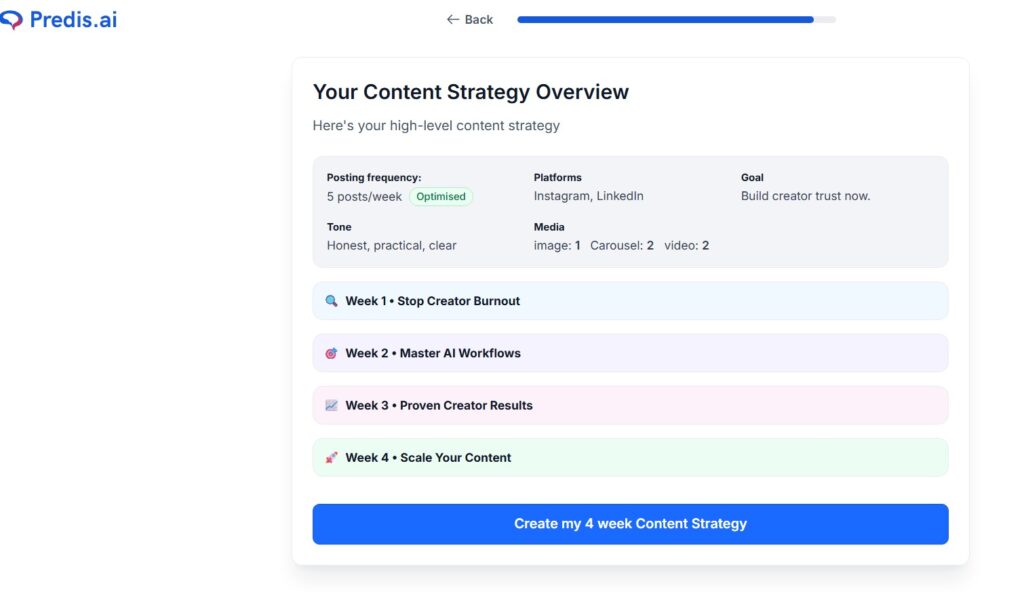
During my test, the caption quality was good and more varied than Buffer’s. The wording felt less repetitive, and the tool seemed designed for marketing content rather than simple casual posting.
However, the interface took longer to understand. I spent more time exploring features and figuring out where everything was located before I reached the result I wanted. That may be fine for someone planning to use the tool regularly, but it felt heavier than necessary when I only wanted a quick Facebook post for a blog article.
Predis.ai currently offers paid plans, including Core at approximately $19 per month and Rise at approximately $40 per month, with higher tiers for larger content needs. Its official Facebook automation pages also describe tools for generating, scheduling, and publishing Facebook content.
- It supports captions and visual content together.
- The output was more varied than some simpler generators.
- It offers scheduling and automation features.
- It may suit bloggers who create frequent promotional campaigns.
What I Did Not Like
- It felt more complicated than I needed for a simple post.
- The useful paid features require a greater budget commitment.
- A solo blogger may not need all the advanced options immediately.
My Verdict on Predis.ai
Predis.ai is impressive if you want a fuller social media content system. However, for a budget-conscious blogger testing tools for occasional Facebook promotion, it may feel like more platform than necessary.
3. Canva AI: Best for Fast Visual Facebook Posts
Website: Canva
AI post generator: Canva AI Social Media Post Generator
Official pricing: Canva Pricing
Canva was the tool I already had open in another tab, which probably says a lot about how naturally it fits into a blogger’s workflow.
When I create a Facebook post, I rarely need only a caption. I usually also need a visual: a blog title graphic, a promotional image, a quote layout, or a branded design that looks clear on mobile.
Canva’s advantage is that it lets me work on the design and the post copy in the same place. I could create a visual, generate caption ideas, and adjust the final result without jumping between multiple platforms.
During testing, I produced a usable Facebook post, including a visual concept, in under three minutes.
The writing itself was not the most creative output of all the tools I tested. It was useful and clear, but it sometimes felt more general than the text I could produce with ChatGPT. Still, for a standard promotional post, it was good enough—and the design workflow made it much more practical.
Canva confirms that users can begin with a range of AI-powered tools on its Free plan, while paid plans unlock increased usage and additional premium features.
- It combines caption creation and visual design.
- It was fast and familiar to use.
- The free plan is practical for testing and regular basic work.
- It is useful for bloggers who need attractive post images as well as text.
What I Did Not Like
- The AI writing was not as nuanced as some dedicated writing tools.
- Some premium templates and advanced brand features require a paid plan.
- It is not primarily a scheduling platform.
My Verdict on Canva AI
Canva is one of the best everyday choices for bloggers who want to create complete Facebook posts quickly. It may not produce the most human-sounding caption by itself, but the combination of visuals, speed, and simplicity makes it extremely useful.
For more tools that reduce time spent on content creation, I also recommend reading my guide to time-saving tools for bloggers.
4. ContentStudio: Best for Larger Content Operations
Website: ContentStudio
Official pricing: ContentStudio Pricing
ContentStudio felt different from the other tools in this test.
It is built less like a quick Facebook post generator and more like a wider content management platform. It includes AI writing, publishing, scheduling, content discovery, and tools for managing multiple social channels. It acts like an automation tool, as it can be linked to N8N, Make, Zapier, and other tools.
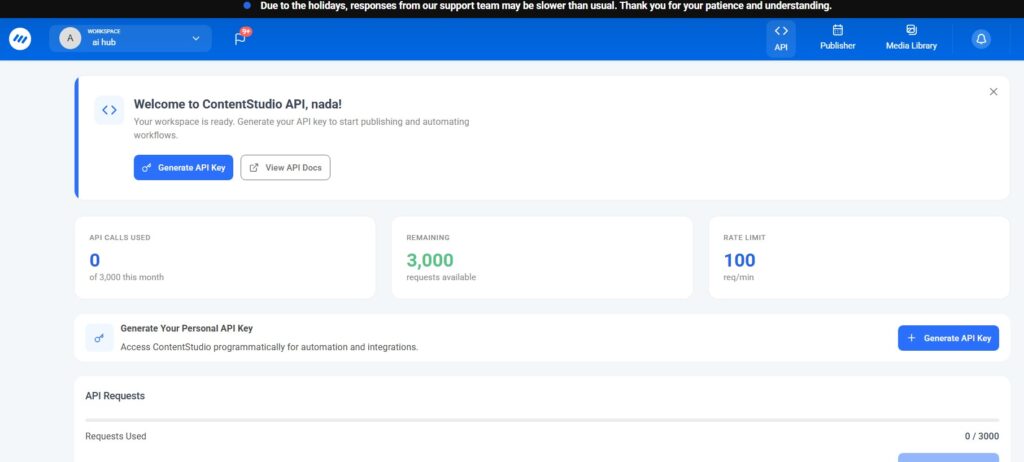
It gives you 3000 requests at first, then you generate your API key.
For someone running several brands, handling client accounts, or producing a large amount of social content, that structure makes sense.
For me, as a blogger who wanted to generate a Facebook post quickly, it felt heavier.
I spent much longer getting comfortable with the dashboard than I did with Canva, Buffer, or ChatGPT. Once I understood the workflow, the output quality was good. The captions felt more marketing-focused and specific than some simpler tools.
However, the learning curve mattered. A tool cannot really save me time if I need to spend too long learning it before I can create a usable post.
ContentStudio presents its pricing as scalable for freelancers, in-house social teams, and agencies, with current plan details available on its official pricing page.
ContentStudio can write the Facebook post caption itself, and it can also schedule or publish the post if you use the full platform.
For your testing, there are two ways to use it:
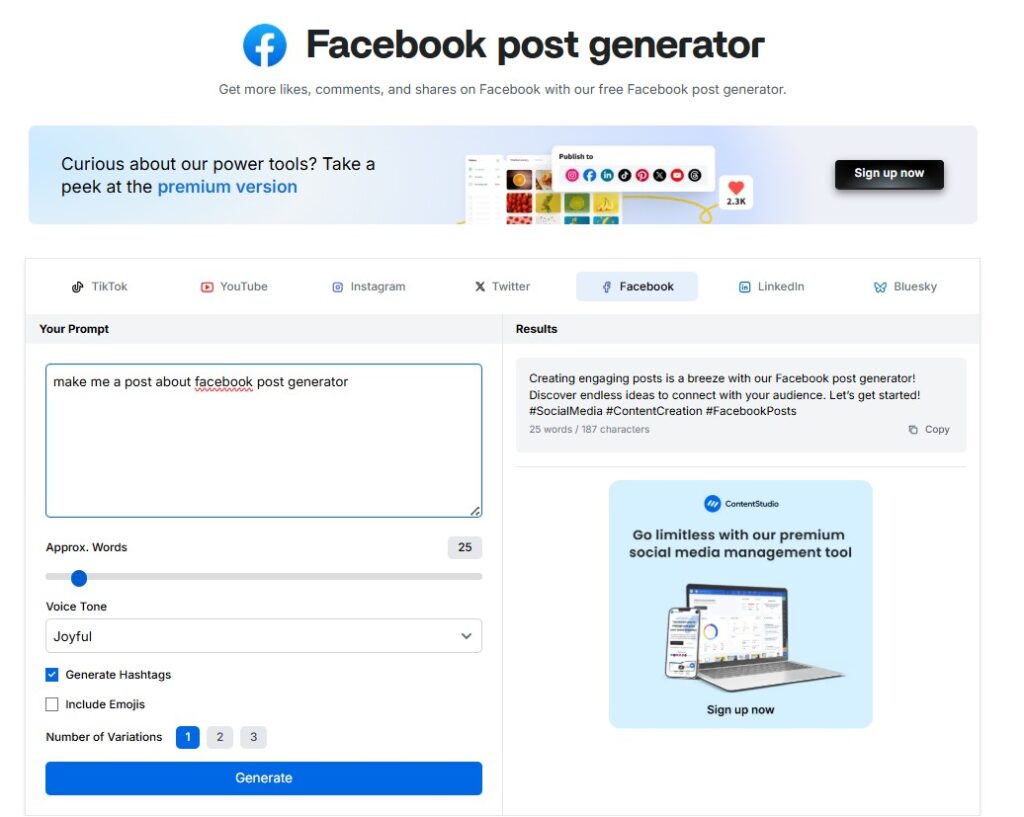
Option 1: Use the Free Facebook Post Generator
This is the quickest way to test the writing quality without setting up a full social media dashboard.
- Open ContentStudio’s free Facebook Post Generator.
- In the prompt box, describe the post you want.
- Choose the word count.
- Select the tone, such as Informative, Professional, Persuasive, Informal or Witty.
- Turn hashtags and emojis on or off.
- Choose how many variations you want.
- Click Generate.
ContentStudio’s official generator says it creates Facebook captions from your prompt and lets you control word count, tone, hashtags, emojis, and the number of versions generated.
Example Prompt You Can Test
Write a Facebook post for a food blog promoting a new article about low-calorie meal prep. Target busy women who want easy healthy meals. Use a friendly and helpful tone, include a clear reason to click, and end with a question. No hashtags.
This lets you compare its writing quality fairly with ChatGPT, Canva, Buffer and the other tools in your article.
Option 2: Use ContentStudio Inside the Full Dashboard
This is the better test if you want to see the complete workflow: write, add media, preview and schedule the Facebook post.
- Create an account or start the free trial on ContentStudio.
- From the dashboard, click Compose.
- Choose Social Post.
- Select your connected Facebook Page or account.
- Open the AI Toolkit on the right-hand side.
- Choose the AI Caption Generator or AI Writing Assistant.
- Enter your prompt, select the tone and generate your caption.
- Add an image or media file.
- Preview how the post will appear on Facebook.
- Choose whether to publish immediately, schedule it or save it as a draft.
ContentStudio’s current documentation states that its social composer connects with the AI Toolkit for caption writing, while the composer supports platform-specific posts, previews and scheduling.
- Stronger fit for users managing multiple channels.
- More complete content operations features.
- Good quality once I understood the workflow.
- Useful for serious social media planning.
What I Did Not Like
- It felt excessive for quick blog promotion.
- The dashboard required more time to learn.
- It was not my first choice as a low-cost beginner tool.
My Verdict on ContentStudio
ContentStudio makes sense if you are already thinking seriously about scaling or automating your social media content process. For a solo blogger looking for a quick Facebook caption, I would begin with something simpler.
5. SocialBee: Best for Recycling Evergreen Blog Content
Website: SocialBee
AI generator: SocialBee AI Post Generator
Official pricing: SocialBee Pricing
SocialBee caught my attention because it focuses strongly on reusing and organizing content.
As a blogger, this is interesting because old articles often continue to be useful long after publication. A post about meal planning, blogging tools, or simple recipes does not necessarily become irrelevant after one Facebook promotion.
SocialBee allows users to organize posts into categories and build a schedule around content that can be shared again over time. That makes it especially appealing for bloggers who already have an archive of published articles.
The AI caption generator was reliable and relevant, although it was not the most creative output in my test. Its real value was not only writing a caption. It was helping turn existing blog content into an ongoing social media schedule.
SocialBee provides a free AI post generator on its website, while its broader social media platform offers a 14-day free trial. The Bootstrap paid plan currently starts at $29 per month and includes five social channels and unlimited AI content generation.
- Very useful for bloggers with evergreen content.
- Category-based scheduling helps keep posts balanced.
- It can give older blog articles new promotional life.
- The AI generator can be tested before paying for the full platform.
What I Did Not Like
- The full platform requires a paid plan after the trial.
- The starting paid price is a serious commitment for a new blogger.
- If you do not already have a library of articles, its strongest feature matters less.
My Verdict on SocialBee
SocialBee is a smart option for established bloggers with a large archive of content. If you are still building your blog and mainly need quick promotional captions, I would wait before paying for it.
This is also why building a simple content calendar for bloggers becomes important before investing in a larger social media system.
6. ChatGPT: Best for Flexible, Human-Sounding Facebook Copy
Website: ChatGPT
Official free-tier information: ChatGPT Free Tier FAQ
Official plans: ChatGPT Pricing
ChatGPT is not a dedicated Facebook post generator, and I initially thought that might make it weaker than the purpose-built tools.
Instead, it became my favorite for writing.
The main reason is flexibility. A dedicated social tool often has a preferred format or style. ChatGPT allowed me to explain exactly what I wanted: the audience, tone, length, topic, call to action, and even what I wanted to avoid.
For example, this prompt worked particularly well for me:
“Write a casual Facebook post for a healthy eating blog promoting a new article about low-calorie meal prep. Keep it under 100 words, use a warm tone, include one question at the end to encourage comments, and avoid hashtags.”
The result sounded more natural than most of the other outputs I tested. It still needed a small edit to make it completely mine, but it gave me the strongest starting point.
ChatGPT Free currently includes limited access to GPT-5.5 and tools such as web search and file or image uploads. Free usage is limited, and higher plans offer expanded access.
- The output sounded the most natural when the prompt was specific.
- It was highly flexible for different blog niches and tones.
- The free plan was enough to start testing real posts.
- It worked well for creating several versions of one idea.
What I Did Not Like
- It does not automatically schedule posts.
- It is not a dedicated Facebook publishing platform.
- A weak prompt usually produces generic copy.
My Verdict on ChatGPT
For bloggers who know their audience and want help writing posts that sound human, ChatGPT is difficult to beat. It gave me the best copy quality with the least editing.
Quick Comparison: Which Facebook Post Generator Is Right for You?
| Tool | Free Access | Starting Paid Option | Best For | Content Quality | Ease of Use |
|---|---|---|---|---|---|
| Buffer AI | Free plan available | From $5/month per channel billed yearly | Writing and scheduling together | 4/5 | 5/5 |
| Predis.ai | Testing available | From about $19/month | Visual campaigns and multiple formats | 4/5 | 3/5 |
| Canva AI | Free plan available | Paid plans available | Fast captions with visual design | 3/5 | 5/5 |
| ContentStudio | Check current trial/plans | See official pricing | Larger content operations | 4/5 | 3/5 |
| SocialBee | Free generator and 14-day platform trial | From $29/month | Evergreen content recycling | 3/5 | 3/5 |
| ChatGPT | Free plan available | Paid plans available | Flexible, human-sounding copy | 5/5 | 4/5 |
My Honest Opinion After Testing These Tools
The truth is that most Facebook post generator tools can produce acceptable captions.
Very few produce something I would publish without editing.
The AI usually gets me most of the way there, but I still need to add a specific detail, adjust the opening line, or remove wording that feels too polished. The strongest result is usually not the first version the tool creates; it is the version after I guide it properly.
I also discovered that features matter less than workflow.
Predis.ai and ContentStudio offered more advanced possibilities, but I did not necessarily need them for a simple weekly blog promotion. Canva was easier when I needed a design. Buffer made sense when I needed scheduling. SocialBee became interesting only when I thought about reusing an existing article archive.
For writing quality alone, ChatGPT gave me the most natural results.
The other major lesson was that the prompt matters almost as much as the tool. Asking for “a Facebook post about food” will usually produce something generic. Telling the tool your niche, target reader, desired tone, word limit and call to action produces a much better result.
Common Mistakes to Avoid When Using a Facebook Post Generator
Using a Generic Prompt
A vague instruction creates a vague post. Include your topic, audience, tone and what you want the reader to do next.
Publishing Without Editing
AI-generated text can sound repetitive or too polished. Read the post aloud before publishing and change any sentence that does not sound like you.
Paying for Features You Do Not Need
A solo blogger posting twice a week does not need the same software as a marketing team managing several brands. Test free options first and only upgrade when a specific limitation starts costing you time.
Choosing a Tool Only Because It Has More Features
More features can also mean more setup, more learning and more expense. A simple tool that you actually use every week may be more valuable than a powerful platform you rarely open.
My Best Facebook Post Generator Choice
After testing all six tools, my personal winner is:
ChatGPT
For my needs as a blogger, it offered the best balance of writing quality, speed, and budget value.
When I used a specific prompt, ChatGPT generated Facebook posts that sounded more human and required less editing than the other tools I tested. Because the free plan is enough to begin experimenting, I could use it without immediately committing to another monthly subscription.
My close runner-up is Buffer AI.
If my priority were writing and scheduling posts in one dashboard, Buffer would probably be my first choice. Its free plan is genuinely practical for a small creator, and its paid entry point is reasonable when scheduling becomes more important.
Canva remains the tool I would use alongside either one whenever I need a visual Facebook post rather than copy alone.
Final Thoughts
Finding the right Facebook post generator depends on how you actually work.
If you want captions that sound more like your own writing, start with ChatGPT.
If you want AI writing and scheduling together, try Buffer.
If you need a fast post design as well as a caption, Canva is a practical option.
For me, ChatGPT earned a regular place in my workflow because it helped me create stronger Facebook copy quickly without adding complexity or cost at the beginning.
My advice is simple: choose one tool, test it with real posts for two weeks, and notice how much editing you still need before publishing. The best Facebook post generator is not the one with the longest feature list. It is the one that saves you time while still allowing your content to sound like you.