

I remember the day I first opened an AI writing tool — I was excited, overwhelmed, and frankly a little confused. There were dozens of tools popping up every week, each promising to save time, write better content, or “magically” fix writer’s block. But as a small website owner and solo blogger, I didn’t have time to test endless tools. I needed something that actually worked — something simple, practical, and worth the price.
This article is for you if you’re tired of scrolling endless comparison pages, worried you’ll pick the wrong tool, afraid of paying for something you’ll never use, or just want real feedback from someone who has tried these tools for blog posts, emails, and Pinterest content. I’ll walk through the best AI writing tools, how much they cost, what they’re good at, their limits, what real users say, and when it’s worth paying for a subscription (and when it isn’t).
Why AI Writing Tools Matter for Small Creators
If you’re juggling content creation with everything else — product launches, email newsletters, personal admin, updates to your WordPress theme, community questions — writing consistently is exhausting. AI tools help in three main ways:
- Speed: Rough drafts in seconds instead of hours.
- Brainstorming: Headline ideas, Pinterest captions, and email hooks when you’re stuck.
- Rewriting: Turning clunky drafts into polished blocks of text.
But AI is not a replacement for your authentic voice or judgment; it’s a support system. The best tools help you write faster — not blindly replace your content with generic factory text.
How I Tested These Tools
Over the past 18 months, I have actively used multiple AI tools for:
- Long‑form blog posts about diet, menopause, kidney health.
- Email sequences for small launches and newsletters.
- Pinterest titles, descriptions, and image text suggestions.
- WordPress draft creation and outline generation.
Some tools I abandoned quickly because the output was low quality or required too much cleanup. Others have become reliable parts of my workflow — but each has pros and cons you should know.
A quick note on pricing: AI tool pricing changes often, sometimes every few months. The numbers below reflect what each company was publicly charging at the time of writing — always double-check the provider’s own pricing page before you subscribe.
1. ChatGPT (OpenAI)
What it does: A conversational AI that can draft nearly anything — emails, headlines, blog outlines, speaking scripts, pin text.
Pricing:
- Free tier with limited usage
- ChatGPT Plus: $20/month (faster responses, priority access)
Pros:
- Very easy to start with — no templates required.
- Can generate multiple versions of the same prompt quickly.
- Great for brainstorming and outlining blog posts.
Cons:
- Produces generic content if prompts are vague.
- Doesn’t specialize for marketing copy or Pinterest unless prompt is specific.
- Output requires human editing for tone and accuracy.
Real user feedback: “I love ChatGPT because it never shuts down like some other tools, and I can keep asking questions. But the more general my prompt, the more generic the text sounds.” — Jane, health blogger
Best for: Brainstorming ideas, outlines, rewriting paragraphs, and drafting quick emails.
Not best for: Fully polished blog posts you want to publish without editing.
Why subscribe (Plus)? Faster responses and more reliable access during peak times.
Why not? If all you want is basic draft help and you’re okay with editing heavily, the free version often works.
2. Jasper AI
What It Does
Jasper is designed more for marketers, bloggers, and businesses that want structured AI writing workflows instead of a simple chatbot. It includes templates for blog posts, email sequences, product descriptions, social media captions, and marketing content — including Pinterest copy.
Pricing
- Pro plan starts around $69/month when billed monthly
- Lower pricing is available with annual billing
- Business plans are available for teams and companies
Pros
- Structured templates help beginners organize content more easily
- Good for long-form blog writing, email campaigns, and marketing copy
- Works reasonably well alongside WordPress workflows
- Offers more built-in content organization than simple chat-based tools
Cons
- More expensive than beginner-friendly AI tools
- Still needs editing to sound natural and human
- Can feel overwhelming at first because there are many tools and settings inside the platform
Real User Feedback
“Jasper saves tons of time, but you still need clear direction — otherwise it gives you a lot of extra content you may not actually need.” — Fred, content creator
Best For
Bloggers, marketers, and business owners who publish content regularly and want a more structured writing system.
Not Best For
Casual users who only write occasionally or want the AI to do everything automatically.
Why Subscribe?
Jasper makes sense if you create long-form content consistently and want built-in workflows, templates, and organization tools.
Why Not?
If you mainly need brainstorming help or occasional blog drafts, simpler and cheaper tools may be enough.
3. Writesonic
What It Does
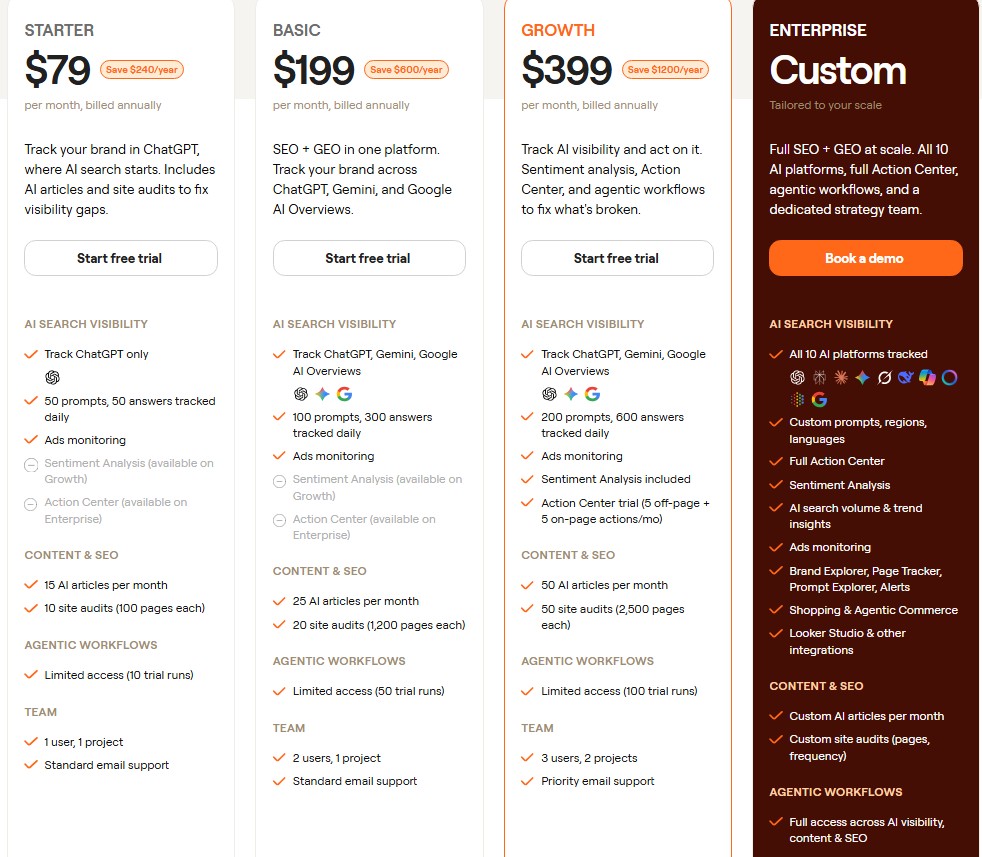
Writesonic focuses on fast AI content generation for blog posts, ads, emails, product descriptions, and Pinterest content. It is especially popular with beginners looking for affordable short-form writing help.
Pricing
- Free plan with limited usage
- Paid plans generally range from around $79–$399/month depending on features and usage limits
Pros
- More affordable than many premium AI writing tools
- Works well for quick Pinterest descriptions, email intros, and marketing snippets
- Fast content generation with a relatively simple interface
- Useful for brainstorming multiple content variations quickly
Cons
- Output quality can vary depending on the prompt
- Long-form blog posts often need significant editing and restructuring
- Some sections can sound repetitive or generic without careful guidance
Real User Feedback
“Writesonic gave me good starting ideas quickly, especially for Pinterest text and email drafts, but I still had to rewrite parts to make them sound more natural.” — Sara, small business blogger
Best For
Articles, Pinterest content, short-form marketing text, quick blog ideas, and beginner-friendly AI writing support.
Not Best For
Publishing long blog posts with minimal editing.
Why Subscribe?
It can save a lot of time if you regularly create short-form content and want something more affordable than premium AI platforms.
Why Not?
If you want highly polished long-form articles without much manual editing, you may outgrow it quickly.
4. Copy.ai
What it does: Simple interface with marketing templates — headlines, social media posts, ad copy, email text.
Pricing:
- Free plan with limited credits
- Pro plan: ~$29/month billed monthly, or about $24/month billed yearly
Pros:
- Easy to use with minimal setup.
- Good for non‑technical users creating quick marketing text.
Cons:
- Not as powerful for robust blog posts.
- Free plan limits output quickly.
Real user feedback: “I use Copy.ai for email lines and Pinterest captions — it’s simple and gets the job done.” — Ava, lifestyle blogger
Best for: Short‑form marketing text.
Not best for: Deep long‑form content without structure.
Why subscribe? If you regularly need short marketing copy — headlines, ad variations, social captions, quick email lines — Copy.ai’s Pro plan is worth it for the speed alone; there’s almost no learning curve.
Why not? If your main need is long-form blog posts or built-in SEO and workflow tools, you’ll outgrow Copy.ai fast — it’s built for short bursts of text, not full articles.
5. Rytr
What it does: Affordable, straightforward tool for quick drafts and templates.
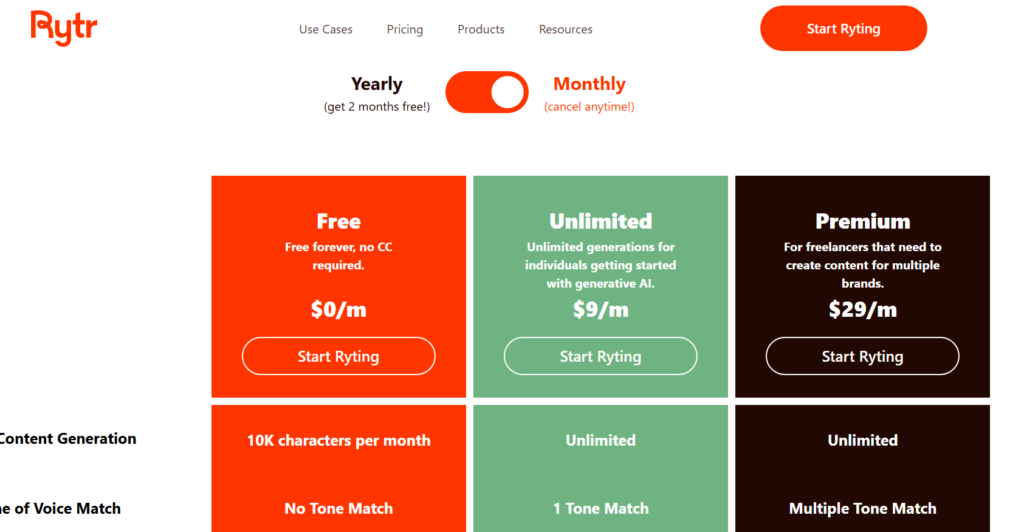
Pricing:
- Free tier
- Unlimited plan: ~$9/month for monthly subscriptions, or about $7.50/month billed yearly
Pros:
- Super simple for beginners.
- Affordable unlimited plan.
- Works decently for short pieces.
Cons:
- Less accurate tone control unless you refine the prompts.
- Not ideal for complex blog prose.
Real user feedback: “Rytr is fast and cheap, but you still need to guide it carefully.” — Lily, health niche blogger
Best for: Quick draft sentences and titles.
Not best for: Long essays or detailed blog sections.
Why subscribe? At roughly $7.50–$9/month, Rytr’s Unlimited plan is one of the cheapest unlimited AI writing options around — a solid fit if you mainly need short drafts, captions, and quick copy on a tight budget.
Why not? If you publish long, detailed blog posts regularly, Rytr’s tone needs more manual guidance than pricier tools, so you may spend more time editing than you save.
Cons: Generic output without edits, needs prompt guidance.
Best For: Drafts, email templates, Pinterest text.
Cons: Learning curve, needs prompts.
Best For: Long-form blog posts, email sequences.
Cons: Not ideal for long-form blogs, output can sound robotic.
Best For: Quick blog snippets, emails, social posts.
Cons: Interface can feel busy.
Best For: Blogs, Pinterest pins, ads, emails — all-around tool.
How to Use These Tools for Blog Posts
Instead of asking AI to write the whole post in one go (which often results in generic text), here’s a practical workflow I use:
- Ask the AI to generate several headline options based on my topic and keywords.
- Use the best headline to create an outline (5–7 sections).
- Write my own introduction and conclusion — this keeps the voice human.
- Ask the AI to draft body paragraphs for each section — but with specific requests (“Include an example from real life… write like a human, not robotic”).
- Go through the draft and edit — this is where the content gets real, not generic.
Example: For a Pinterest tutorial I wrote recently, I used ChatGPT to draft several title options and pin text ideas. I chose the best ones, rewrote them with my brand voice, and the result was both keyword‑friendly and genuinely helpful — not just recycled phrases.
How to Use These Tools for Emails
AI is particularly useful for newsletters because the format is shorter and email tone is more conversational. Here’s a simple workflow — and if you’re still building your list from scratch, it’s worth reading how I built my first email list with zero blog traffic first.
- Generate 5–10 subject line options with AI.
- Use AI to draft the first paragraph based on your topic.
- Write the middle and closing paragraphs yourself.
- Ask AI to suggest rewrite options with a warmer or more casual tone.
Real feedback: A newsletter I drafted using AI had a dull opening. Once I rewrote just the first 2 paragraphs with personal anecdotes, engagement went up because readers felt it was written by a person, not a bot.
How to Use These Tools for Pinterest Content
For Pinterest, quick, punchy text is key. AI helps by giving multiple options fast — though the words on the pin only get you so far; pairing them with solid Pinterest SEO fundamentals is what actually gets pins found.
- Ask for 10 pin titles for your blog post.
- Ask for 5 different pin descriptions that include primary keywords.
- Choose the most engaging ones — some will feel too robotic, so edit them.
Example: I once had Pinterest text that was technically accurate but boring. After editing the AI suggestions with stronger verbs and audience‑focused phrasing, the pin descriptions felt like real copywriters wrote them.
Common Mistakes to Avoid with AI Writing Tools
- Letting AI write without editing: You’ll end up with generic, vague text.
- Using too many tools at once: Pick one primary tool initially so you don’t burn time switching between interfaces.
- Overreliance on free tiers: Sometimes free credits run out at the worst moments — plan ahead.
- Not customizing prompts: Vague prompts always produce vague results.
- Ignoring SEO or readability: AI might generate text with keyword stuffing or poor flow — always revise.
Checklist for Choosing the Best AI Writing Tools
- Do you need short text or long‑form blog content?
- What is your budget?
- Do you want built‑in templates?
- How much editing are you willing to do?
- Does the tool integrate with WordPress or other systems you use?
Conclusion: Choosing Your Next Step
The best AI writing tools are those that fit your workflow, comfort level, and budget. There’s no single perfect tool for everyone, but here’s a quick summary:
- ChatGPT: Best starting point for most beginners — strong for brainstorming and flexible drafts.
- Jasper: Great for structured blog posts and email campaigns if you can budget it.
- Writesonic: A solid, affordable choice for short‑form content and Pinterest text.
- Copy.ai: Simple and fast for marketing snippets.
- Rytr: Budget‑friendly for quick ideas.
If you’re unsure, start with ChatGPT free or Plus. Use it for brainstorming and outlines. Once you outgrow it, explore Jasper for structured writing or Writesonic for short‑form content. No matter what tool you choose, the key to great content is your voice, experience, and editing — not the AI alone.
Pick one tool, build a small routine around it, and focus on writing content that reflects you — not just an algorithm. That’s how you write faster without losing your authenticity.